Display
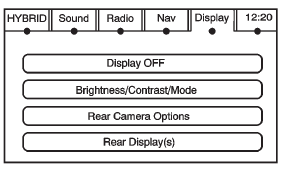
Press CONFIG to enter the configure menu options, then press CONFIG repeatedly until Display is selected or press the Display screen button.
Display OFF
Press this screen button to turn the display off. Press any control button to view the display.
Brightness/Contrast/Mode

Press this screen button to change the brightness, contrast, and mode of the display.
 (Brightness): Press + or − to increase or decrease the brightness of the screen.
 (Contrast): Press + or − to increase or decrease the contrast of the screen.
Auto (Automatic): Press so the system can automatically adjust the screen background depending on exterior lighting conditions.
Night: Press to make the map background darker.
Day: Press to make the map background brighter.
Test yourself
A quick Cadillac Escalade quiz: every answer comes with an explanation and a link to the manual page.