Using the PRESET buttons
Assigning the PRESET buttons
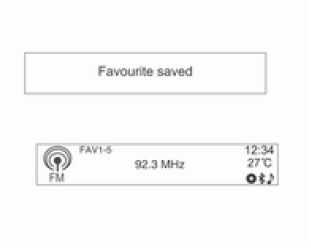
Press the FAVOURITE button [FAV1-2-3] to select the desired set of stored radio stations.
Press and hold any of the PRESET buttons [1 ~ 6] to assign the current radio station or DAB station to that button in the selected set of favourite stations.
- You can save up to six radio stations or DAB stations in each favourite station set.
- The number of favourite station sets in use can be set in the menu Settings → Radio Settings → Favourite Radio Stations (max. number of favourite station sets).
- If a new station is assigned to a PRESET [1 ~ 6] button that already had a radio station assigned to it, the previous content will be deleted and replaced with the new stored radio station or DAB station.
Switching on reception of the station assigned to a PRESET button
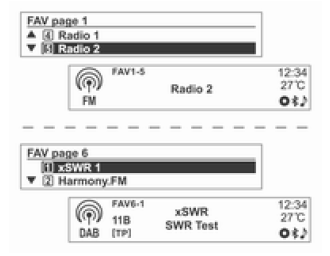
Press the FAVOURITE button [FAV1-2-3] to select the desired stored (favourite) FAV set of stations.
Information item number 1 for the selected FAV set of stored (favourite) stations will be displayed.
Press the PRESET button [1 ~ 6] to switch on reception of the radio station/DAB station assigned to that button.
Using the radio menu or DAB menu
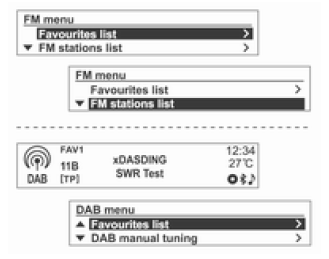
Press the MENU-TUNE button to display the radio menu or DAB Menu.
Turn the MENU-TUNE knob to go to the desired menu option, then press the MENU-TUNE button to select that item or display its detailed menu.
FM/AM/DAB Menu → Favourites List
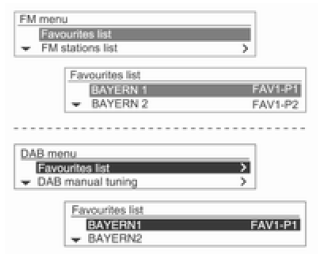
In the FM/AM/DAB Menu, turn the MENU-TUNE knob to select Favourites List, then press the MENU-TUNE button.
Information about Favourites Lists will be displayed.
Turn the MENU-TUNE knob to select the desired Favourites List, then press the MENU-TUNE button to switch on reception of the corresponding radio station.
FM/AM Menu → FM/AM Station List
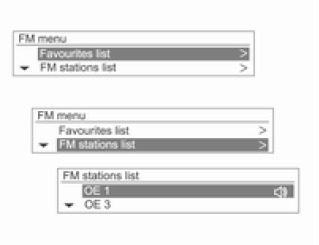
In the FM/AM Menu, turn the MENU-TUNE knob to select FM Station List/AM Station List, then press the MENU-TUNE button.
Information about FM Station Lists/AM Station Lists will be displayed.
Turn the MENU-TUNE knob to select the desired station list, then press the MENU-TUNE button to switch on reception of the corresponding radio station.
FM/DAB Menu → FM/DAB Category List
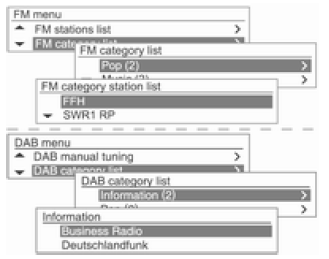
In the FM/DAB Menu, turn the MENU-TUNE knob to go to FM Category List/DAB Category List, then press the MENU-TUNE button.
The FM category list/DAB category list will be displayed.
Turn the MENU-TUNE knob to select the desired station list, then press the MENU-TUNE button to start receiving the corresponding radio frequency.
DAB menu → DAB Announcements
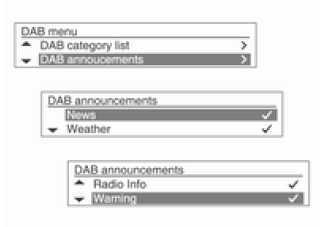
In the DAB menu, turn the MENU-TUNE knob to DAB Announcements, then press the MENU-TUNE button.
The DAB Announcements menu will be displayed.
Turn the MENU-TUNE knob to select the desired items, then press the MENU-TUNE button to start receiving the corresponding radio frequency.
FM/AM/DAB menu → Update FM/AM/DAB station list
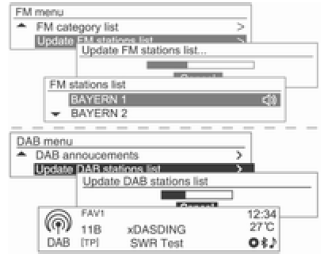
In the FM menu/AM menu/DAB menu, turn the MENU-TUNE knob to Update FM station list/Update AM station list/Update DAB station list, then press the MENU-TUNE button.
- The update of the FM station list/AM station list/DAB station list will start.
- During the update of the FM station list/AM station list/DAB station list, press the MENU-TUNE button or the P BACK button to prevent the changes from being saved.
Test yourself
A quick Chevrolet Aveo quiz: every answer comes with an explanation and a link to the manual page.