RDS (Radio Data System)
- RDS (Radio Data System) is a service offered by FM radio stations that makes it much easier to find stations with clear reception.
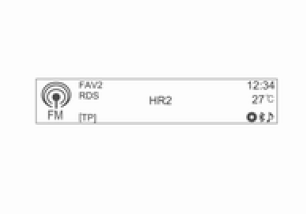
- RDS stations are identified by their program name and broadcast frequency.
Displaying RDS information
When receiving an RDS station, press the INFORMATION [INFO] button to display the information broadcast via RDS.
Setting up RDS
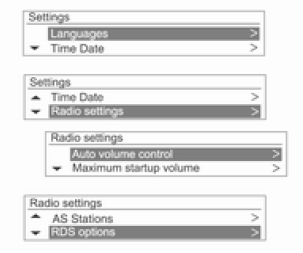
Press the CONFIG button to display the settings menu.
Turn the MENU-TUNE knob to Radio Settings, then press the MENU-TUNE button.
Turn the MENU-TUNE knob to select RDS Options, then press the MENU-TUNE button.
Turning RDS on and off
For RDS, select On or Off.
Turning on RDS offers the following benefits:
- For a preset station, the program name is displayed instead of the frequency.
- The audio-navigation system always tunes to the best-received frequency for the preset station using the AF (Alternative Frequency) function.
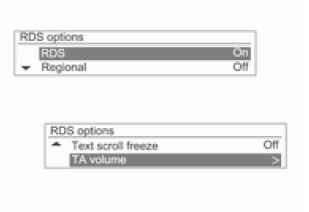
In the RDS Options menu, turn the MENU-TUNE knob to RDS: Off, then press the MENU-TUNE button to turn RDS on.
Turning regionalization on and off
To use regionalization, RDS must be turned on.
Some RDS stations broadcast different regional programs on different frequencies.
For Regional (REG), select On or Off.
When regionalization is on, only alternative frequencies (AF) carrying the same regional program are selected.
If regionalization is off, alternative station frequencies are selected regardless of the regional program.
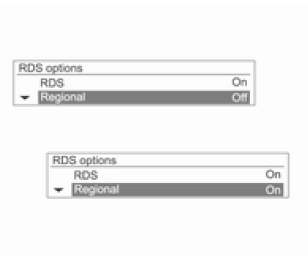
In the RDS Options menu, turn the MENU-TUNE knob to Regional: Off, then press the MENU-TUNE button to turn regionalization on.
Turning scrolling text stop on and off
To turn the Scrolling Text Stop function (which displays program information) on or off:
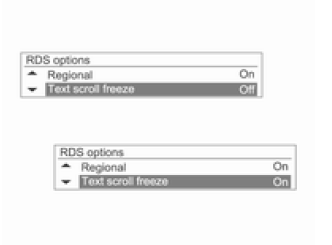
In the RDS Options menu, turn the MENU-TUNE knob to RDS Text Stop: Off, then press the MENU-TUNE button to turn the Scrolling Text Stop function on.
Traffic announcement volume (TA)
The minimum traffic announcement (TA) volume can be preset.
The minimum traffic announcement volume can be increased or decreased relative to the normal volume level.

In the RDS Options menu, turn the MENU-TUNE knob to TA Volume, then press the MENU-TUNE button.
Turn the MENU-TUNE knob to adjust the TA Volume level, then press the MENU-TUNE button.
Radio traffic announcements
TP = Traffic Program. Stations broadcasting traffic programs are RDS stations that transmit information for drivers.
To turn the traffic announcement standby function on or off in the audio-navigation system:
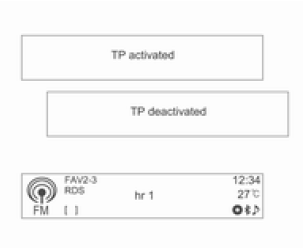
In any mode other than phone mode, press the TP button to turn the radio traffic announcement function on or off.
- If the radio traffic announcement function is on, the symbol [ ] is displayed in the main radio menu.
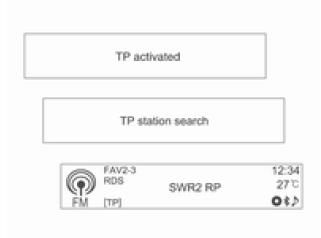
- If the selected station does not broadcast traffic announcements, a search for the nearest station that does starts automatically.
- Once a station broadcasting traffic announcements is found, the [TP] symbol is displayed in the main radio menu.
- When the traffic announcement function is on, playback from CD/MP3/USB/iPod/Bluetooth and AUX sources is interrupted during announcements.
Blocking traffic announcements
To block traffic announcements, e.g.,
while playing a CD/MP3 or listening to a radio program:
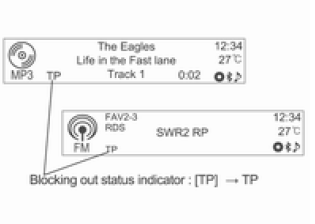
In any mode other than phone mode, press the TP button.
Turn on the radio traffic announcement function and turn the audio-navigation system volume all the way down.
Traffic announcements are blocked, but the announcement function remains on.
Blocking the current traffic announcement
To block the current traffic announcement, e.g., while listening to a radio program:

In any mode other than phone mode, press the TP button.
Test yourself
A quick Chevrolet Aveo quiz: every answer comes with an explanation and a link to the manual page.