iPod player
Applies only to models equipped with an iPod player connector.
Main buttons/knob
The main buttons and controls listed below are used to play music files from iPod devices.
(9) CD/AUX Button
Press this button when an iPod is connected to select iPod playback mode.
(14) MENU-TUNE knob button
- Turn the knob to display the playlist.
- Press the button to display the menu screen related to the current item or mode.
(8) Buttons SEEK

- Press one of these buttons to go to the previous or next track.
- Press and hold one of these buttons to fast-reverse or fast-forward the track, then release to resume playback at normal speed.
(7) INFORMATION [INFO] button
Displays information about the track being played.
(16) BACK button BACK
Press to go back to the previous entry or the previous menu.
Connecting an iPod
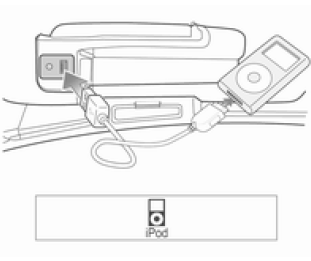
Pull open the cover above the instrument panel in front of the passenger seat to connect an iPod containing music files for playback to the USB port.
- The system supports the iPod models listed below.
- iPod 2G Nano/iPod 3G Nano/ iPod 4G and 5G Nano
- iPod 120GB and 160GB Classic
- iPod 1G, 2G and 3G Touch
- iPhone 3G and 3GS
- iPods must be connected to the system only with the connection cables supported by these devices. Do not use other connection cables.
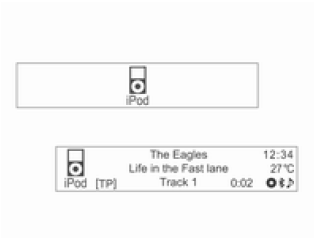
- In some cases, the iPod may be damaged if the ignition is turned off while the iPod is being connected to the system.
When the iPod is not in use, disconnect it from the system with the ignition off.
- When the system finishes loading information from the iPod, playback starts automatically.
- If an iPod that cannot be read is connected, an error message will be displayed and the system will automatically switch to the previously used function or the FM radio station.
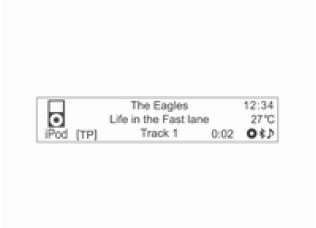
If the iPod to be played is already connected, press the CD/AUX button to select the iPod.
- Playback automatically resumes from the point where it was last interrupted.
- The playback functions and information shown on the display of an iPod connected to the system may differ from those on the iPod itself in terms of playback order and method, as well as the type of information displayed.
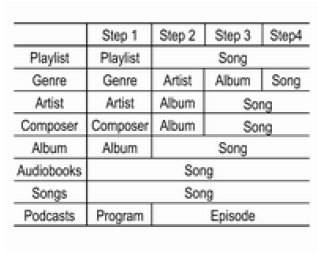
- The table below shows the classification items used by the iPod search function.
Other iPod music playback functions are similar to those of the CD/MP3 player.
Ending iPod Playback
To end playback, press the RADIO BAND or CD/AUX button to select another function.
Using the iPod Menu
The Shuffle/Repeat/Search... commands (including audiobooks and composers) in the iPod Menu are similar to the commands in the CD Menu of the CD/MP3 player. Only the Disconnect iPod command has been added. See the CD/MP3 player function description.
iPod Menu → Disconnect iPod
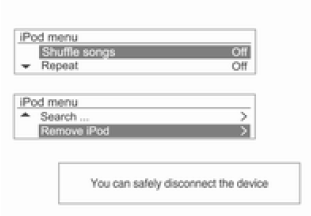
In playback mode, press the MENU-TUNE button to display the iPod Menu.
Turn the MENU-TUNE knob to scroll to Disconnect iPod, then press the MENU-TUNE button. A message will be displayed indicating that the device can be safely disconnected.
Disconnect the iPod from the USB port.
Return to the previously used function.
Test yourself
A quick Chevrolet Aveo quiz: every answer comes with an explanation and a link to the manual page.