Overview
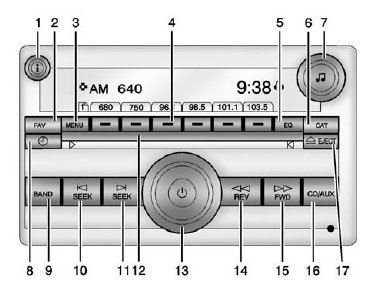
 (Information)
Press to show information on the current station or track.
FAV (Favorites Pages)
Press to scroll through the favorite pages.
MENU
Press to open the tone menu to adjust the bass, midrange, treble, fade, and balance.
Buttons 1 - 6
Save and select favorite stations.
EQ (Equalizer)
Press to adjust the equalizer settings.
CAT (Category)
Press to display a list of XM categories.
 (Tone)
Press to set the bass or treble.
 (Clock)
Press to set the clock.
BAND
Press to scroll through the available bands AM, FM, or XM if equipped.
 SEEK
Seeks the previous station.
 SEEK
Seeks the next station.
DVD Slot
 (Power/Volume)
Press to turn the infotainment system on or off.
Turn to adjust the volume.
 REV (Reverse)
Press and hold to go backward fast through a track.
 FWD (Forward)
Press and hold to fast forward through a track.
CD/AUX
Press to scroll through selecting the CD or an auxiliary device.
 EJECT
Press to eject the loaded CD.
Some models offer advanced features like built-in GPS navigation, satellite radio, and smartphone integration. Steering wheel-mounted controls further enhance safety and convenience by allowing drivers to operate the infotainment system without taking their hands off the wheel.
Test yourself
A quick Chevrolet Captiva quiz: every answer comes with an explanation and a link to the manual page.