Steering Wheel Controls
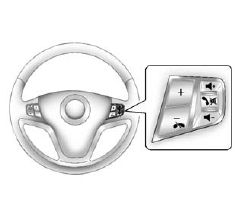
For vehicles with audio steering wheel controls, some audio controls can be adjusted at the steering wheel.
+ / −: Press and release to go to the next or the previous preset radio station or CD track.
 : For vehicles with Bluetooth® and OnStar®, press and hold to interact with those systems. Press and release to mute the system.
Press it again to turn the sound back on.
 : Press to reject an incoming call, or end a current call.
 : Move the thumbwheel up or down to increase or to decrease the volume.
Steering wheel may have buttons dedicated to phone operations and voice commands. These controls allow the driver to answer, end, and make phone calls hands-free, provided the vehicle is equipped with Bluetooth connectivity. Voice command buttons enable the driver to interact with the vehicle's infotainment system using voice prompts, allowing for navigation inputs, audio adjustments, and other functions to be managed verbally. This integration of steering wheel controls promotes a safer driving experience by minimizing distractions and enabling the driver to stay focused on the road while managing various in-car functions seamlessly.
Test yourself
A quick Chevrolet Captiva quiz: every answer comes with an explanation and a link to the manual page.