On-Board Computer
Use the buttons on the turn signal lever to select menus and functions.
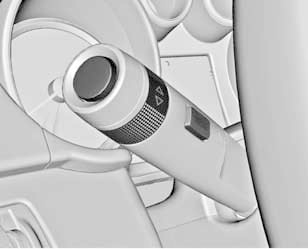
Press the MENU button to select the Trip/Fuel Information menu.
Turn the thumbwheel to select one of the submenus:
• Trip Computer
• Average Fuel Economy
• Driving Range
• Average Speed
• Instant Fuel Economy
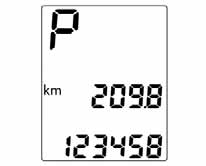
To reset the odometer readings, press the reset button or press and hold the SET/CLR button for several seconds.
Average Fuel Consumption
Displays the average fuel economy. The result can be reset at any time.
To reset the readings, press and hold the SET/CLR button for several seconds.
Range
The driving range is calculated based on the current fuel level in the tank and the current fuel economy. An averaged value is displayed.
After refueling, the driving range value is updated automatically after some time.
When the fuel level in the tank is low, the corresponding message is displayed on the Driver Information Center.
At the same time, the indicator located inside the fuel gauge dial illuminates.
Average Speed
Displays the average driving speed. The result can be reset at any time.
To reset the readings, press and hold the SET/CLR button for several seconds.
Instant Fuel Economy
Displays the instant fuel economy. At low speeds, fuel consumption per hour is displayed.
Test yourself
A quick Chevrolet Cruze quiz: every answer comes with an explanation and a link to the manual page.