Chevrolet Cruze Repair Manual
Rear Brake Rotor Replacement
In this manual: Chevrolet Cruze Repair Manual
11steps
~66min
3/5difficulty
Done 0 of 11
Special Tools
- CH 41013 Rotor Resurfacing Kit
- CH 42450-A Wheel Hub Resurfacing Kit
For equivalent regional tools, refer to Special Tools.
Removal Procedure
Warning: Refer to Brake Dust Warning in the Preface section.
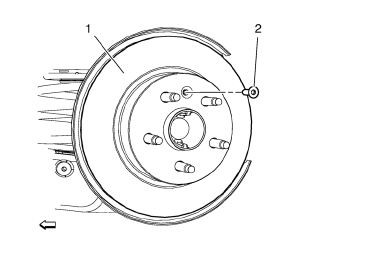
- Remove rear brake caliper bracket. Refer to Rear Brake Caliper Bracket Replacement
- Matchmark the position of the brake rotor to the wheel studs.
- Remove the rear brake rotor bolt (2).
- Remove rear brake rotor (1) from the wheel hub.
Installation Procedure
- Using the CH 42450-A kit , thoroughly clean any rust or corrosion from the mating surface of the hub/axle flange.
- Using the CH 41013 kit , thoroughly clean any rust or corrosion from the mating surface and mounting surface of the brake rotor.
- Inspect the mating surfaces of the hub/axle flange and the rotor to ensure that there are no foreign particles or debris remaining.
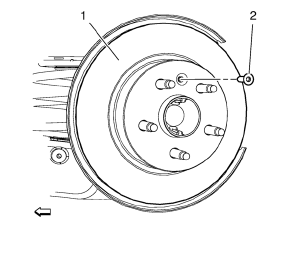
- Install the brake rotor (1) to the hub/axle flange. Use the matchmark made prior to removal for proper orientation to the flange.
Caution: Refer to Fastener Caution in the Preface section.
- Install rear brake rotor bolt (2) and tighten to 7 N·m.
- If the brake rotor was removed and installed as part of a brake system repair, measure the assembled LRO of the brake rotor to ensure optimum performance of the disc brakes. Refer to Brake Rotor Assembled Lateral Runout Measurement.
- If the brake rotor assembled LRO measurement exceeds the specification, bring the LRO to within specifications. Refer to Brake Rotor Assembled Lateral Runout Correction.
Test yourself
A quick Chevrolet Cruze quiz: every answer comes with an explanation and a link to the manual page.
Was this page helpful?