Vehicle Features
Radio(s)
VOL/  : Press to turn the system
Press to show available information about the current station or track.
 SEEK: Press to seek the previous
Buttons 1–6: Press to save and select favorite stations
For more information about these and other radio features.
Storing a Favorite Station
Stations from all bands can be stored in the favorite lists in any order. Up to six stations can be stored in each favorite page and the number of available favorite pages can be set.
To store the station to a position in the list, press the corresponding numeric button 1-6 until the station can be heard again.
Setting the Clock
For detailed instructions on setting either clock, see Clock.
To set the time:
1. Press  to enter the menu options.
12/24 HR Format: Press the 12 HR screen button for standard time; press the 24 HR screen button for military time.
Day + or Day −: Press the Day + and Day − display buttons to increase or decrease the day.
Display: Press the Display to turn the display of the time on the screen on or off.
Satellite Radio
Vehicles with a SiriusXM® satellite radio tuner and a valid SiriusXM satellite radio subscription can receive SiriusXM programming.
SiriusXM Satellite Radio Service
SiriusXM is a satellite radio service based in the 48 contiguous United States and 10 Canadian provinces.
SiriusXM satellite radio has a wide variety of programming and commercial-free music, coast to coast, and in digital-quality sound.
A fee is required to receive the SiriusXM service.
Refer to:
• www.siriusxm.com or call 1-866-635-2349 (U.S.).
• www.xmradio.ca or call
1-877-209-0079 (Canada).
Portable Audio Devices
Some vehicles have a 3.5 mm (1/8 in) auxiliary input and a USB port in the center console bin.
External devices such as iPods®, laptop computers, MP3 players, CD changers, and USB drives may be connected, depending on the audio system.
Bluetooth®
The Bluetooth® system allows users with a Bluetooth-enabled mobile phone to make and receive hands-free calls using the vehicle audio system and controls.
The Bluetooth-enabled mobile phone must be paired with the in-vehicle Bluetooth system before it can be used in the vehicle. Not all phones will support all functions.
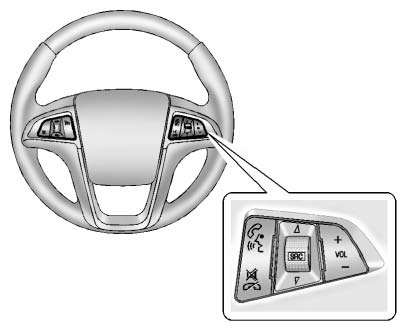
Steering Wheel Controls
Test yourself
A quick Chevrolet Equinox quiz: every answer comes with an explanation and a link to the manual page.