Trip computer
System providing instant information about the journey made (range, consumption, …).

Trip computer Data displays

Data displays
The trip computer is displayed in the instrument cluster display.
Turn the left steering wheel thumbwheel A to display the different trip computer tabs in turn:
- the instantaneous information tab is displayed in zone B of the instrument cluster, showing:
- the range,
- the instantaneous fuel consumption,
- the digital speed or the Stop & Start timer.
- the trip 1 tab is displayed in zone C of the instrument panel, with:
- the distance travelled,
- the average fuel consumption,
- the average speed, for the first trip.
- the trip 2 tab is displayed in zone C of the instrument panel, with:
- the distance travelled,
- the average fuel consumption,
- the average speed, for the second trip.

Resetting the trip
- When the desired trip is displayed, press and hold the left-hand scroll wheel on the steering wheel for more than two seconds.
Trips 1 and 2 are independent and operate identically.
Trip 1 can be used, for example, for daily calculations, and trip 2 for monthly calculations.
Some definitions… Range (km or miles)
It shows the distance that can still be travelled with the fuel remaining in the tank, based on the average consumption over the most recent kilometres driven.
This value may vary following a change in driving style or terrain, causing a significant variation in instantaneous consumption.When the range is less than 30 km, dashes are displayed. After adding at least 5 litres of fuel, the range is recalculated and displayed if it exceeds 100 km.
If dashes are displayed continuously while driving instead of figures, consult a CITROËN dealer. Instantaneous consumption (l/100
km or km/l or mpg)
This is the average fuel consumption over the last few seconds.
This function is only displayed from 30 km/h.
 Average consumption (l/100 km
or km/l or mpg)
This is the average fuel consumption since the trip computer was last reset.
 Average speed (km/h or mph)
This is the average speed calculated since the trip computer was last reset (ignition on).
 Distance travelled (km or miles)
It shows the distance travelled since the trip computer was last reset.
 Stop & Start timer
(minutes / seconds or hours / minutes)
If your vehicle is fitted with Stop & Start, a timer accumulates the time spent in STOP mode during the journey.
It resets each time the ignition is switched on with the key.
Return to the main instrument cluster displaySuccessive turns of the left-hand scroll wheel allow you to return to the main display of the instrument panel screen (vehicle speed reminder), via the navigation information reminder screen, then the screen showing only the total odometer and the trip odometer at the bottom.
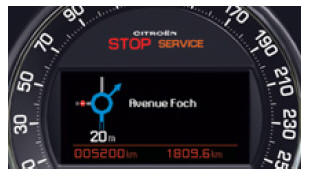
Navigating the instrument cluster display Reminder of navigation information in the instrument cluster display
You can display the navigation information reminder on the instrument panel screen by turning the left-hand scroll wheel on the steering wheel.
Check function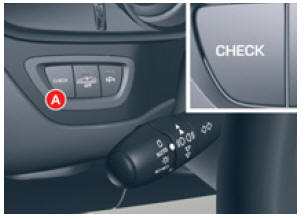
Check function
This function displays the warning log.
- Press control A .
The following messages are displayed in turn on the instrument panel screen:
- Tyre pressure check.
- Service indicator reminder.
- Display of any warning messages.
- Oil level check.
Test yourself
A quick Citroen C5 quiz: every answer comes with an explanation and a link to the manual page.