USB Player
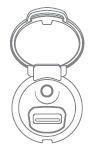 The module consists of a USB port
and a Jack socket, depending on the model.
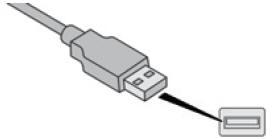
Insert the USB memory device into the USB socket, or connect a USB peripheral device to the USB socket using a suitable cable (sold separately).
 Press and hold the
LIST REFRESH button to display the different classification types.
 Select by "Folder" /
"Artist" / "Genre" / "Playlist".
 Press OK to select the required
category, then press OK again to confirm.
 Briefly press LIST REFRESH
to display the previously selected browsing mode.
 Browse the list using the
left/right and up/down buttons.
 Press OK to confirm the selection.
 Press one of these buttons
to go to the previous / next track in the list.
Press and hold one of the buttons to fast forward or fast reverse.
 Press one of these buttons
to go to the previous / next "Folder", "Artist", "Genre" or "Playlist" in the list.
Test yourself
A quick Citroen DS3 quiz: every answer comes with an explanation and a link to the manual page.