Location and Controls
The instrument cluster display features an interactive display located in the instrument cluster.
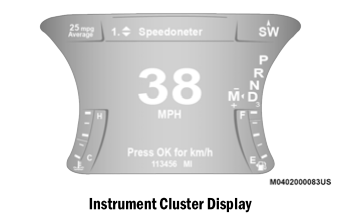
This system conveniently allows the driver to select various useful information by pressing the arrow buttons located on the left side of the steering wheel. The instrument cluster display menu items consist of the following:
Speedometer
- Vehicle Information
- Driver Assist — if equipped
- Fuel Economy
- Trip
- Audio
- Messages
- Display Settings
The system allows the driver to select information by pressing the following buttons located on the steering wheel:
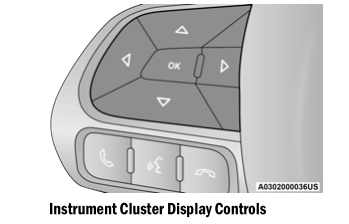
Up and Down Arrow Buttons:
Using up or down
 arrow button scrolls through the main menu items.
Changes the main screen area and the menu title area.
Left and Right Arrow Buttons:
Using left or right
 arrow button scrolls through the submenu items of the main menu item.
NOTE:
- Press and hold up
 or down
 or left or
 right
 arrow button will continuously scroll through the currently selected menu or the settings shown on the screen.
- When returning to the main menu, the last submenu screen viewed will appear in the main menu.
OK Button:
For Digital Speedometer:
- Pressing OK button changes the units of measurement (mph or km/h).
For Display Settings:
- The OK button allows the user to enter the menu and submenus.
- In each submenu layer, the up
 and down
 arrow buttons allow the user to select the desired item.
- Pressing the OK button makes a selection and a confirmation screen will appear (returning the user to the first page of the submenu).
- Pressing the left
 arrow button will close each submenu level and return to the main menu.
Test yourself
A quick Dodge Charger quiz: every answer comes with an explanation and a link to the manual page.