Powertrain
Selector Lever Knob
In this manual: Powertrain
2steps
~12min
1/5difficulty
Done 0 of 2
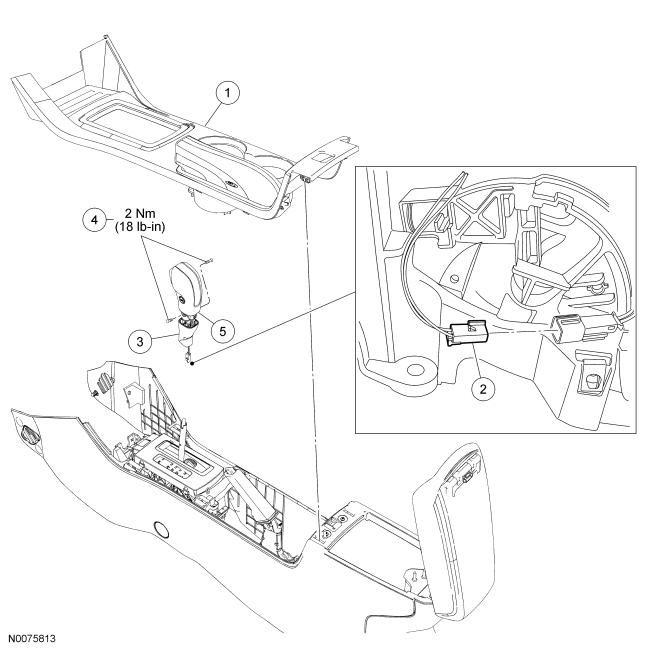
| Item | Part Number | Description |
|---|---|---|
| 1 | 5404567 | Center console trim cover |
| 2 | 7C453 | Transmission Control Switch (TCS) electrical connector |
| 3 | — | Selector lever knob shroud (part of 7L010) |
| 4 | W701894-S437 | Selector lever knob screws |
| 5 | 7L010 | Selector lever knob |
Removal
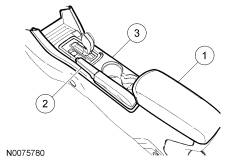
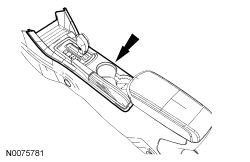
- Remove the center console trim cover.
- Lift the arm rest.
- Apply the parking brake.
- Lift the center console trim cover straight up, remove the emergency brake lever from the boot and remove the trim cover.
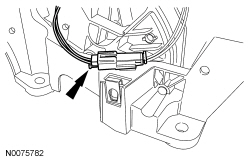
- NOTE: Selector lever assembly removed for clarity.
Disconnect the Transmission Control Switch (TCS) electrical connector.
- Using a suitable tool, slide the selector lever knob shroud down.
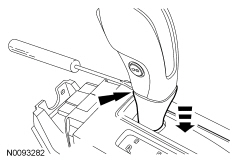
- Remove the selector lever knob screws, selector lever knob and the shroud.
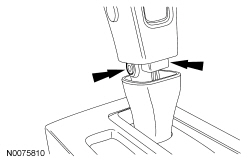 Installation
- Route the wiring harness through the selector lever bezel and position the selector lever knob and shroud onto the selector lever.
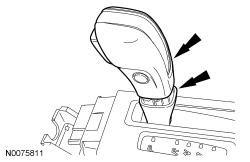
- Install the 2 selector lever knob screws.
- Tighten to 2 N·m.
- Slide the selector lever knob shroud up.
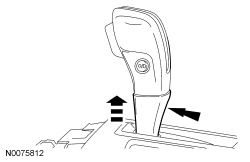
- NOTE: Selector lever assembly removed for clarity.
Connect the TCS electrical connector.
- Install the center console trim cover.
Test yourself
A quick Ford Focus quiz: every answer comes with an explanation and a link to the manual page.
Was this page helpful?