Trip computer
Registers the total mileage of the vehicle.
TripmeterRegisters the mileage of individual journeys.
Distance to emptyIndicates the approximate distance the vehicle will travel on the fuel remaining in the tank. Changes in driving pattern may cause the value to vary.
Instantaneous fuel consumptionIndicates the current average fuel consumption.
Average fuel consumptionIndicates the average fuel consumption since the function was last reset.
Average speedIndicates the average speed calculated since the function was last reset.
Outside air temperatureShows the outside air temperature.
Hold 'SET' to set Tyre Pres.Recalibrates the system to the actual pressure of the tyres. See Tyre pressure monitoring system.
MenuEnters the main menu. See General information.

Trip computer A Odometer B Tripmeter C
The trip computer includes the following information displays:
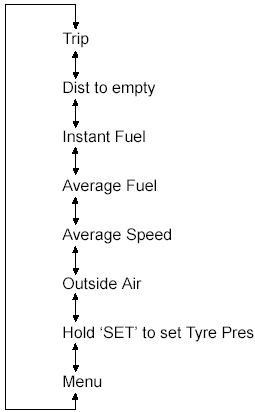
Turn the rotary control to scroll through the trip computer displays.
Note: The position of the trip computer display may vary depending on the information shown in the display. Resetting the trip computer using the main menuTo reset a particular display:
1. Turn the rotary control and highlight Menu. 2. Press the SET/RESET button. 3. Highlight "Reset Trip". 4. Press the SET/RESET button. 5. Highlight the function to be reset.6. Press and hold the SET/RESET button.
Test yourself
A quick Ford Focus quiz: every answer comes with an explanation and a link to the manual page.