General information
WARNING
Failure to pay attention to the road while driving may cause loss of vehicle control, a collision and injury. We strongly recommend that you exercise extreme caution when using any device that may take your attention off the road. Safe driving of your vehicle is your first responsibility. We advise against using portable devices while driving and encourage you to use voice command systems whenever possible. Make sure you are familiar with all applicable laws that may affect the use of electronic devices while driving.
Various systems in your vehicle can be controlled using the controls on the steering wheel information display. Related information is shown on the information display.
Information Display Controls
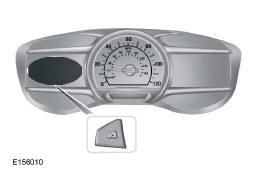
- Press the up and down arrows to scroll through the options and highlight them in a menu.
- Press the right arrow to enter a submenu.
- Press the left arrow to exit a menu.
- Press and hold the left arrow to return to the main menu display at any time (Escape button).
- Press the OK button to select and confirm settings or messages.
Main Menu
From the main menu bar on the left side of the information display, you can choose from the following categories:
 Display/Trip Computer
 Information
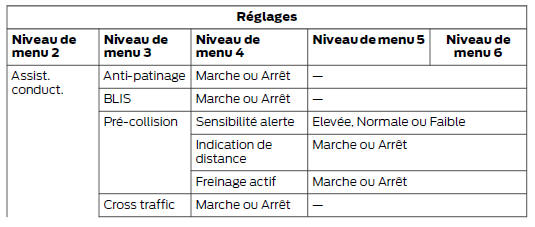
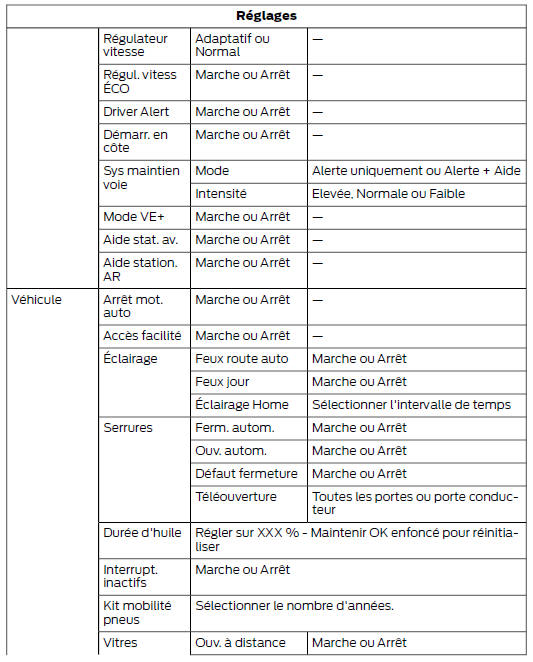
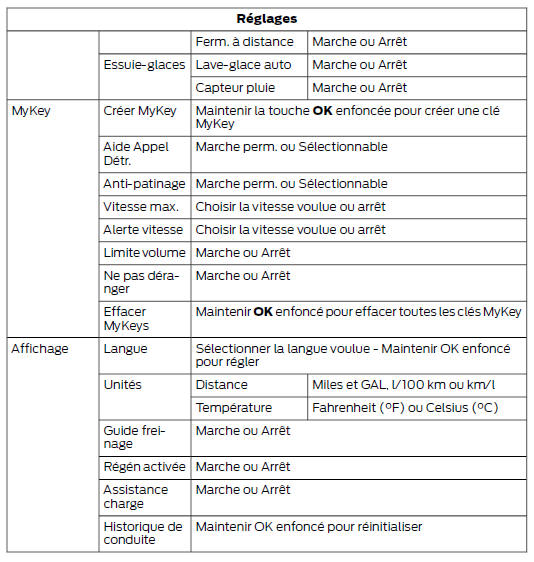
 Settings
Scroll the menu up or down to highlight a category, then press the right arrow or OK to access it. Press the left arrow repeatedly to return to the main menu.
Display/Trip Computer
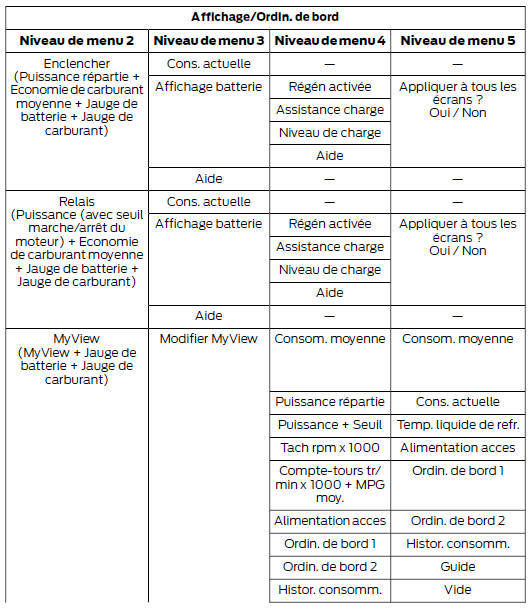
 Use the up or down arrows to select from the following display options.
Note: The cluster stores the level 2 menu status when you change the ignition key position from ON to OFF.
Energi
Energi displays individual gauges for engine power and high-voltage battery power in kilowatts (kW). The engine gauge is white and the high-voltage battery gauge is blue. An optional real-time fuel economy gauge may also be shown. When the vehicle runs on battery power only, EV is displayed and the gauge is blue.
Relay
Relay displays a power gauge in kilowatts (kW), including an engine start or stop threshold.
- When the vehicle runs on battery power only (below this threshold), EV is displayed and the gauge is blue.
- When the vehicle is running on both the engine and the high-voltage battery supplying power, the gauge turns white.
- When the power demand exceeds the amber indicator, this power level and the associated fuel economy are shown in amber.
- When the engine is running, reducing the power demand to drop below the set threshold will shut off the engine.
An optional real-time fuel economy gauge may also be shown.
Note: You can reset the average fuel economy by pressing and holding the OK button on the left steering wheel controls.
MyView
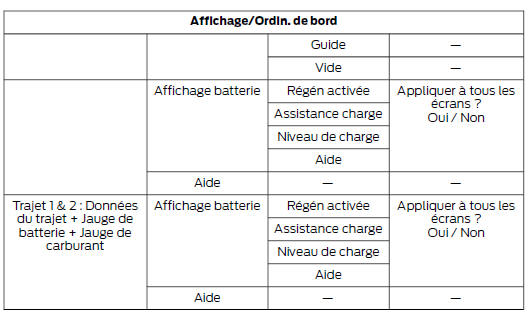
You can choose what to display in this screen. Select Edit MyView in the menu options to scroll through the possible content for both columns.
- Use the up or down arrows to display content.
- Press OK to save your selection.
- You must select content in both columns before you can save your new MyView configuration.
Unique content available in MyView:
- Accessory Power - Shows the electrical power required by vehicle accessories. Accessories use power but do not contribute to vehicle propulsion. The gauge displays the power demand of the air conditioning and other accessories separately, in kilowatts (kW). The Other indication includes all energy used by low-voltage accessories (cabin fans, headlamps, heated seats, etc.).
- Radiator Temp. - Shows the engine coolant temperature.
At normal operating temperature, the level indicator is white and within the normal range (between H and C). If the engine coolant temperature exceeds the normal range, the level indicator turns red to indicate that the engine is overheating.
Stop the vehicle safely as soon as possible, switch off the engine and allow it to cool.
Note: Trip data and average fuel economy cannot be reset from MyView.
Trip 1 & 2
Includes a daily odometer, average trip fuel consumption and driving time.
The distance traveled on battery power only with the engine off is shown in blue next to the total trip distance.
Information
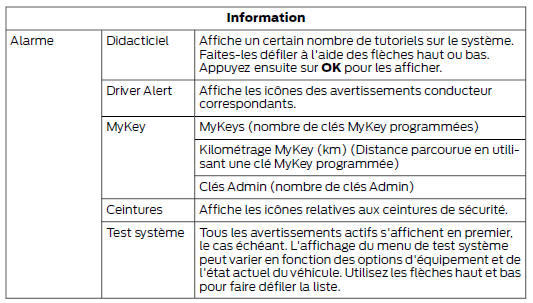
 This mode allows you to
view various vehicle system data and perform a system test.
Settings
 This mode allows you to
configure various driver settings.
Note: Some items are optional and may not appear. Note: Some MyKey items only appear if a MyKey is set up.
Test yourself
A quick Ford Mondeo quiz: every answer comes with an explanation and a link to the manual page.