Remote control
Integrated Key Transmitters (if fitted)
Use the key blade to start your vehicle and to lock or unlock the driver's door from the outside. The transmitter part works like the remote control.
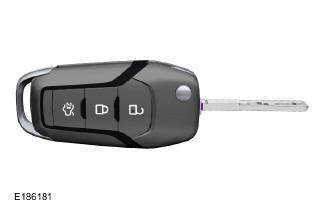
Press the button to release the key.
Press and hold this button to fold the key away when not in use.
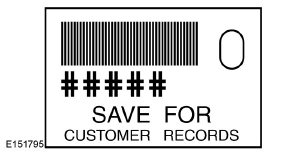
Note: a security label is attached to your vehicle keys and contains important information about the vehicle key blank. Keep this label in a safe place for future reference.

Intelligent Access Key (if fitted)
Your intelligent access keys activate the power locks as well as the remote start system. The key must be inside your vehicle to activate the push button start/stop system.
Folding Key Blade
The intelligent access key also contains a folding mechanical key blade that you can use to unlock the driver's door.
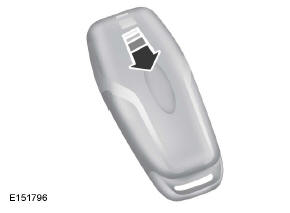
Slide the cover on the back of the remote control, then remove it to access the key blade.
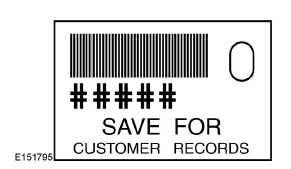
Note: a security label is attached to your spare vehicle keys and contains important information about the vehicle key blank. Keep this label in a safe place for future reference.
Using the Key Blade
The lock cylinder is located under a cover on the driver's door handle.
To remove the cover:
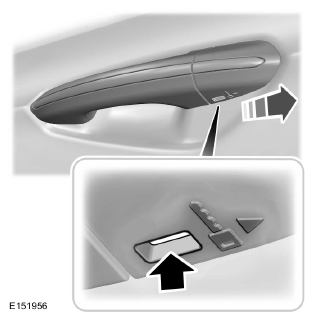
- Insert the key blade into the slot below the handle, then press upward.
- Keep pressing upward and slide the cover toward the rear to release it. While doing so, carefully remove the key.
To install the cover:
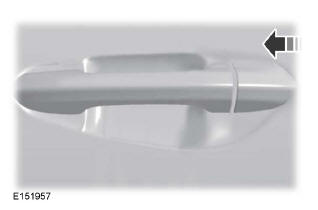
- Position the cover at the rear of the key cylinder.
- While pressing on the cover, slide it forward until it is in place. You may hear a click when the cover is seated.
Make sure the cover is correctly installed by trying to slide it toward the rear.
Replacing the Transmitter Battery
Note: Follow local regulations for disposing of transmitter batteries.
Note: Do not wipe off any grease on the battery terminals or on the back of the circuit board.
Note: It is not necessary to reprogram the transmitter after replacing the battery; it should work normally.
When the transmitter battery is low, a message appears in the information display. See Information Messages
Integrated Key Transmitter
The transmitter is powered by a 3 V lithium coin battery, CR2032 or equivalent.
Press the corresponding button to release the key before starting the procedure.
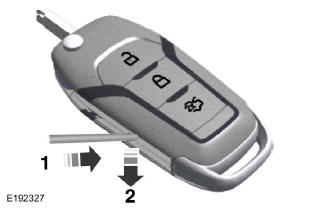
- Insert a suitable tool, such as a flat-blade screwdriver, as shown, and gently push the clip.
- Press the clip to release the battery cover.
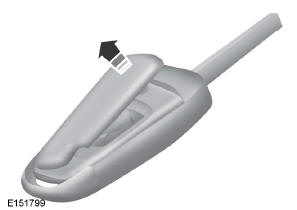
- Remove the cover carefully.

Note: Do not touch the battery contacts or the circuit board with the screwdriver.
- Insert a screwdriver as shown in the illustration to remove the battery.
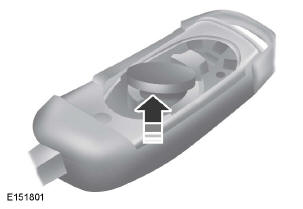
- Remove the battery.
- Install a new battery with the + side facing up.
- Install the battery cover.
Smart Access Transmitter
The transmitter is powered by two 3 V lithium coin batteries, CR2025 or equivalent.
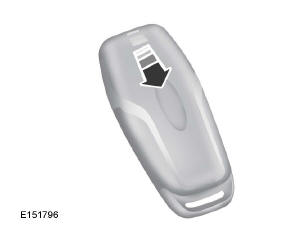
- Slide the cover on the back of the transmitter, then remove it by turning it.

- Insert a coin into the slot, then turn it to separate the case.
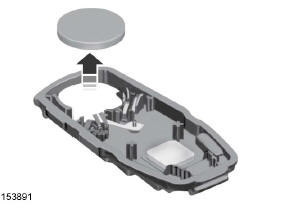
- Remove the batteries.
- Install new batteries with their + sides facing each other.
Note: Make sure to reinstall the label between the two batteries.
- Reassemble the case and the cover.
Remote Start (if equipped)
WARNING
To avoid exhaust gas buildup, do not use remote start if your vehicle is parked indoors or in poorly ventilated areas.
Note: Do not use remote start if the fuel level of your vehicle is low.
 The remote start
button is located on the transmitter.
This feature allows you to start your vehicle from outside.
The transmitter has an extended operating range.
If your vehicle has automatic climate control, you can set it to turn on when you remote start your vehicle. See Climate Control Operation (page 111). Manual climate control systems operate at the last setting used when the engine was turned off.
Restrictions on the use of remote start apply in several states and provinces.
Check the laws in your region, state, or province for specific requirements regarding remote start systems.
The remote start system will not operate if:
- The ignition is on.
- The alarm system has been triggered.
- You have disabled the feature.
- The hood is open.
- The transmission is not in Park (P).
- The vehicle battery voltage is too low.
- The engine maintenance light is on.
Remote Starting the Vehicle
Note: You must press each button within three seconds of each other. Your vehicle cannot be remote started if you do not follow this sequence.

The label on your transmitter shows the starting procedure.
To remote start your vehicle:
- Press the lock button to lock all doors.
- Press the remote start button twice. The exterior lights flash twice.
The horn sounds if the system fails to start, unless quiet start is enabled. Quiet start reduces blower fan speed to lower noise. You can turn this feature on or off in the information display.
See
Note: If you remote start the vehicle using a key with an integrated transmitter, you must turn the ignition on before driving. If you use a smart access transmitter, you must press the START/STOP button on the instrument panel once while depressing the brake pedal before driving.
During remote start, the power windows do not operate and the radio does not turn on automatically.
The parking lights stay on and the vehicle runs for 5, 10, or 15 minutes, depending on the setting.
Extending Vehicle Run Time
Repeat steps 1 and 2 while the vehicle is still running to extend its run time by one additional remote start cycle. If you have set a run time of 10 minutes, the additional 10 minutes begin at the end of the initial run time. For example, if the engine has already run for five minutes during the first remote start, it will keep running for 15 minutes. You can extend the remote start run time up to a maximum of 35 minutes.
After the vehicle has stopped, wait at least five seconds before remote starting it again.
Stopping the Vehicle After a Remote Start
 Press the button once.
The engine switches off and the parking lights turn off.
You may need to be closer to the vehicle due to ground reflection and noise that may come from the vehicle while it is running.
You can turn the remote start system on or off using the information display.
See (page 89).
Memory Function
Your Intelligent Access key recalls the mirror and seat position each time you enter the vehicle, if it matches a preset position. See Memory Function.
Test yourself
A quick Ford Mondeo quiz: every answer comes with an explanation and a link to the manual page.