Vehicle Care
Floor Mats
In this manual: Vehicle Care
3steps
~18min
2/5difficulty
Done 0 of 3
Follow these guidelines for proper use of floor mats.
- Original equipment floor mats were designed for your vehicle. If replacement mats are needed, it is recommended that GM-approved mats be purchased. Non-GM mats may not fit properly and may interfere with the accelerator or brake pedal. Always check that the mats do not interfere with the pedals.
- Do not use a floor mat unless the vehicle is equipped with a floor mat retainer on the driver's side floor.
- Use the floor mat with the correct side up. Do not install it upside down.
- Do not place anything on top of the driver's side floor mat.
- Use only one floor mat on the driver's side.
- Do not place one mat on top of another.
Removal and Installation of Floor Mat
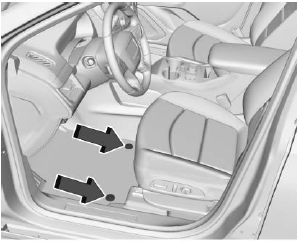
The driver's side floor mat is held in place by two retainers.
- Pull the rear of the floor mat to unlock each retainer and remove the mat.
- To install, align the floor mat holes over the floor mat retainers and snap into position.
- Make sure the floor mat is securely fastened in place. Make sure the floor mat does not interfere with the pedals.
Test yourself
A quick GMC Terrain quiz: every answer comes with an explanation and a link to the manual page.
Was this page helpful?