Audio System Basic Operation
Models with color audio system
To use the audio system, the ignition switch must be in ACCESSORY  or ON
 .
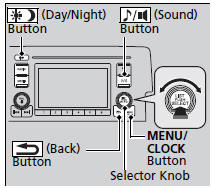
Use the selector knob or MENU/CLOCK button to access some audio functions.
Press to switch between the normal and extended display for some functions.
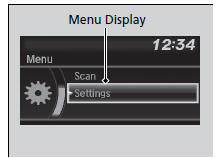
Selector knob: Rotate left or right to scroll through the available choices. Press to set your selection.
MENU/CLOCK button: Press  to select any mode.
The available mode includes the wallpaper, display, clock, language setup, and play modes. Play modes can be also selected from scan, random, repeat, and so on.
 (Back) button: Press to go back to the previous display.
 (Sound) button: Press to select the sound setting mode.
 (Day/Night) button: Press to change the audio/information screen brightness.
Press  , then adjust the brightness using
 .
- Each time you press
 , the mode switches between the daytime mode, nighttime mode and OFF mode.
These indications are used to show how to operate the selector knob.
Rotate  to select.
Press  to enter.
Menu Items
Adjust Clock
Wallpaper Setup
Display Setup
Scan
Play Mode
RDS Settings
Bluetooth
Press the SOURCE  or
 button on the steering wheel to change any audio setting.
Audio Remote Controls
Test yourself
A quick Honda Civic quiz: every answer comes with an explanation and a link to the manual page.