Maintenance
Battery
In this manual: Maintenance
~1min read
Checking the Battery
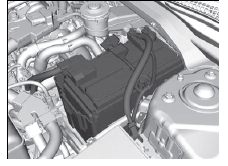
Check the battery terminals for corrosion monthly.
If your vehicle's battery is disconnected or goes dead:
- The audio system is disabled.
- The clock* resets.
- The navigation system* is disabled.
- Canadian models only The immobilizer system needs to be reset.
Battery
WARNING The battery gives off explosive hydrogen gas during normal operation. A spark or flame can cause the battery to explode with enough force to kill or seriously hurt you.When conducting any battery maintenance, wear protective clothing and a face shield, or have a skilled technician do it.
WARNING: Battery post, terminals, and related accessories contain lead and lead compounds.Wash your hands after handling.
Disconnect both battery cables to prevent damaging your vehicle's electrical system.
Always disconnect the negative (-) cable first, and reconnect it last.
*1: Models with the smart entry system have an ENGINE START/STOP button instead of an ignition switch.
Battery
When you find corrosion, clean the battery terminals by applying a baking powder and water solution. Clean the terminal with a damp towel. Cloth/towel dry the battery. Coat the terminals with grease to help prevent future corrosion. When replacing the battery, the replacement must be of the same specifications. Please consult a dealer for more information. The VSA and CMBSTM* indicators may come on when your turn the ignition switch to ON *1 after re-connecting a battery.
Drive a short distance at 20 km/h. Each indicator should go off. If either or both do not, have your vehicle checked by a dealer.
Test yourself
A quick Honda Civic quiz: every answer comes with an explanation and a link to the manual page.
Was this page helpful?