Maintenance
Checking and Maintaining Wiper Blades
In this manual: Maintenance
11steps
~66min
3/5difficulty
Done 0 of 11
Checking Wiper Blades
If the wiper blade rubber has deteriorated, it will leave streaks and the hard surfaces of the blade may scratch the window glass.
Changing the Wiper Blade Rubber

- Turn the ignition switch to LOCK 0*1.
- While holding the wiper switch in the MIST position, turn the ignition switch to ON (w*1, then to LOCK 0*1.
► Both wiper arms are set to the maintenance position as shown in the image.
- Lift both wiper arms.
*1: Models with the smart entry system have an ENGINE START/STOP button instead of an ignition switch.
Checking Wiper Blades
NOTICE Avoid dropping the wiper arm onto the windshield, it may damage the wiper arm and/or the windscreen.
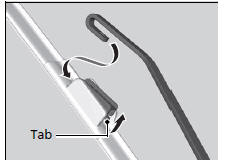
- Press and hold the tab, then slide the holder off the wiper arm.
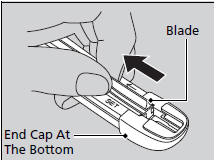
- Pull the end of the wiper blade in the direction of the arrow in the image until it is out of the holder's end cap.
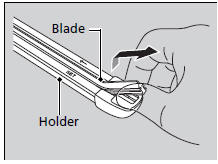
- Pull the wiper blade in the opposite direction to slide it out of its holder.
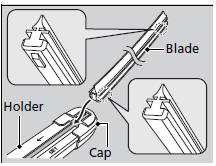
- Insert the flat side of the new wiper blade onto the bottom part of the holder. Insert the blade all the way.
- Install the end of the wiper blade into the cap.
- Slide the holder onto the wiper arm until it locks.
- Lower both wiper arms.
- Turn the ignition switch to ON
 *1 and hold the wiper switch in the MIST position ►ntil both wiper arms return to the standard position.
*1: Models with the smart entry system have an ENGINE START/STOP button instead of an ignition switch.
Test yourself
A quick Honda Civic quiz: every answer comes with an explanation and a link to the manual page.
Was this page helpful?