Maintenance
Remote Transmitter Care
In this manual: Maintenance
7steps
~42min
2/5difficulty
Done 0 of 7
Replacing the Button Battery
If the indicator does not come on when the button is pressed, replace the battery
Replacing the Button Battery
NOTICE An improperly disposed of battery can damage the environment. Always confirm local regulations for battery disposal.Replacement batteries are commercially available or at a dealer.
Master Keys with Remote Transmitter
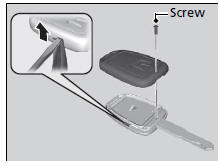
Battery type: CR1620
- Unscrew the cover with a small Phillipshead screwdriver.
- Open the remote transmitter.
► Wrap the small flat-tip screwdriver with a cloth to prevent scratching the transmitter.

- Remove the button battery with the small flat-tip screwdriver.
- Make sure to replace the battery with the correct polarity.
Smart Entry Remote
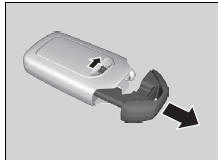
Battery type: CR2032
- Remove the built-in key.
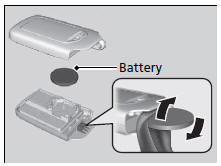
- Remove the upper half of the cover by carefully prying on the edge with a coin. ► Remove carefully to avoid losing the buttons.
► Wrap a coin with a cloth to prevent scratching the smart entry remote.
- Make sure to replace the battery with the correct polarity.
Test yourself
A quick Honda Civic quiz: every answer comes with an explanation and a link to the manual page.
Was this page helpful?