Features
Defaulting All the Settings
In this manual: Features
7steps
~42min
2/5difficulty
Done 0 of 7
Models with Display Audio
Reset all the menu and customized settings as the factory defaults.
- Select
 .
- Select Settings.
- Select System.
- Select the Others tab.
- Select Factory Data Reset.
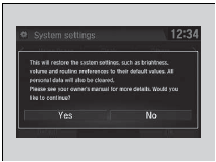
- A confirmation message appears on the screen.
- Select Yes to reset the settings.
- Select Yes again to reset the settings.
- A confirmation message appears on the screen. Select OK.
- After selecting OK, the system will reboot.
Defaulting All the Settings
When you transfer the vehicle to a third party, reset all settings to default and delete all personal data. If you perform Factory Data Reset, it will reset the preinstalled apps to their factory default.If you perform Factory Data Reset, you cannot use the HondaLink because it becomes off line.
Test yourself
A quick Honda Civic quiz: every answer comes with an explanation and a link to the manual page.
Was this page helpful?