Driver Information Interface
The driver information interface shows the odometer, trip meter, outside temperature indicator, and other gauges.
It also displays important messages such as warnings and other helpful information.
Switching the Display
Main displays
Press the (display/information) button and press
 or
 to change the display. Press ENTER to see detailed information.
Switching the Display
You can edit, add, and delete the meter contents using the audio/information screen.
Customizing the Meter
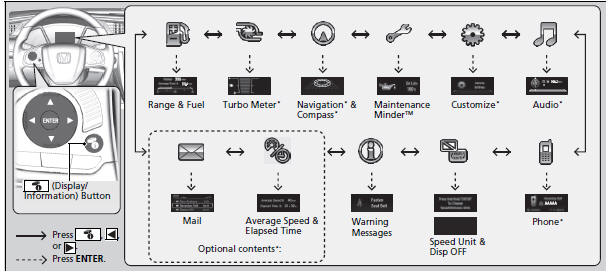
* Not available on all models
Trip computer
Press the  (TRIP) knob to change the display.

Odometer
Shows the total number of miles or kilometers that your vehicle has accumulated.
■Trip Meter
Shows the total number of miles or kilometers driven since the last reset. Meters A and B can be used to measure two separate trips.
Resetting a trip meter
To reset a trip meter, display it, then press and hold the  knob. The trip meter is reset to 0.0.
Switch between trip meter A and trip meter B by pressing the knob.
Average Fuel Economy
Shows the estimated average fuel economy of each trip meter in mpg or l/100 km.
The display is updated at set intervals. When a trip meter is reset, the average fuel economy is also reset.
You can change when to reset the average fuel economy.
Customized Features
Range
Shows the estimated distance you can travel on the remaining fuel. This distance is estimated from the fuel economy of your previous trips.
Elapsed Time
Shows the time elapsed since Trip A or Trip B was reset.
Elapsed Time
You can change when to reset the elapsed time.
Average Speed
Shows the average speed in mph or km/h since Trip A or Trip B was reset.
You can change when to reset the average speed.
Engine Oil Life
Shows the remaining oil life and Maintenance MinderTM.
Outside Temperature
Shows the outside temperature in Fahrenheit (U.S.) or Celsius (Canada).
Adjusting the outside temperature display
Adjust the temperature reading up to ’5’F or ’3’C if the temperature reading seems incorrect.
Use the driver information interface’s customized features or audio/information screen to correct the temperature.
Instant Fuel Economy
Shows the instant fuel economy as a bar graph in mpg or l/100 km.
Turbo Meter*
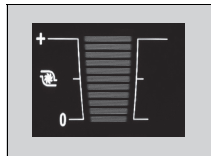 When the turbo charger is producing boost, this meter shows the boost pressure.
Turn-by-Turn Directions*
Shows you turn-by-turn driving directions to your destination linked with the navigation system.
* Not available on all models
Outside Temperature
The temperature sensor is in the front bumper.
Road heat and exhaust from another vehicle can affect the temperature reading when your vehicle speed is less than 30 km/h.
It may take several minutes for the display to be updated after the temperature reading has stabilized.
Turn-by-Turn Directions*
You can select whether the turn-by-turn display comes on during the route guidance.
Audio*
Shows the current audio information.
Mail*
Shows the current mail information.
Phone*
Shows the current phone information.
Models with color audio system
Customized Features
Use the driver information interface to customize certain features.
How to customize
Select the Vehicle Settings screen by pressing the  button while the ignition switch is in ON (w*1, and the vehicle is at a complete stop. Select Vehicle Settings, then press the ENTER button.

*1: Models with the smart entry system have an ENGINE START/STOP button instead of an ignition switch.
Customized Features
To customize other features, press the /
 button.
List of customizable options
Example of customization settings
Customization flow
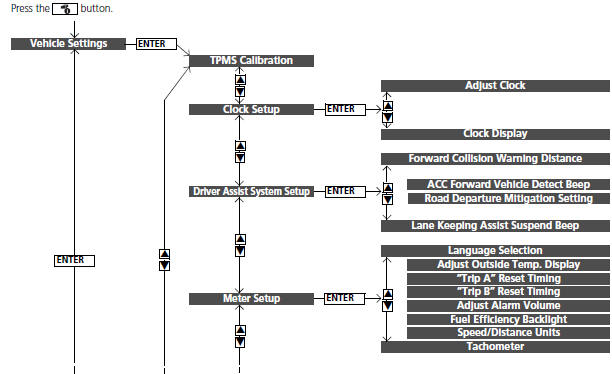
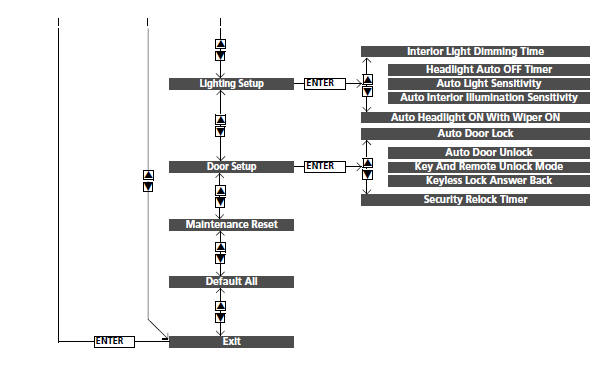
List of customizable options
| Setup Group | Customizable Features | Description | Selectable Settings |
| TPMS Calibration | ’ | Calibrates the TPMS. | Cancel/Calibrate |
| Clock Setup | Adjust Clock | Adjusts clock. | ’ |
| Clock Display | Selects the digital clock display from 12H to 24H. | 24h/12h*1/OFF | |
| Forward Collision Warning Distance | Changes at which distance the CMBSTM alerts. | Long/Normal*1/Short | |
| Driver Assist System Setup | ACC Forward Vehicle Detect Beep | Causes the system to beep when the system detects a vehicle, or when the vehicle goes out of ACC range. | ON/OFF*1 |
| Road Departure Mitigation Setting | Changes the setting for the road departure mitigation system. | Normal*1/Wide/Warning Only | |
| Lane Keeping Assist Suspend Beep | Causes the system to beep when the LKAS is suspended. | ON/OFF*1 | |
| Meter Setup | Language Selection | Changes the displayed language. | English*1/French/Spanish |
| Adjust Outside Temp. |
Display
Example of customization settings
The steps for changing the ’Trip A’ Reset Timing setting to When Refueled are shown below. The default setting for ’Trip A’ Reset Timing is Manually Reset.
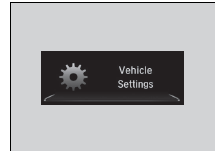 1. Press the
 button to select Vehicle Settings, then press the ENTER button.
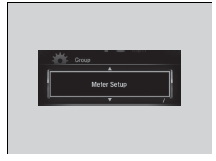 2. Press the
 button until Meter Setup appears on the display.
3. Press the ENTER button.
- Language Selection appears first in the display.
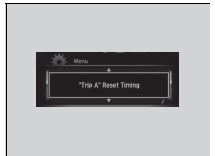 4. Press the
 button until ’Trip A’ Reset Timing appears on the display, then press the ENTER button
- The display switches to the customization setup screen, where you can select When Refueled, IGN Off, Manually Reset, or Exit.
 5. Press the
 button and select When Refueled, then press the ENTER button.
- The When Refueled Setup screen appears, then the display returns to the customization menu screen.
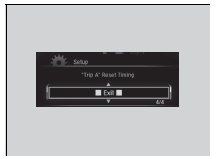 6. Press the
 button until Exit appears on the display, then press the ENTER button.
7. Repeat Step 6 until you return to the normal screen.
Test yourself
A quick Honda Civic quiz: every answer comes with an explanation and a link to the manual page.