How to Select a Play Mode
You can select repeat, random, and scan modes when playing a file.
Available mode icons appear above the play mode buttons.
Press the button corresponding to the mode you want to select.
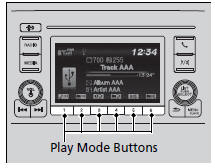
To turn off a play mode
Press the selected button.
Play Mode Menu Items
Repeat
 Repeat One Folder: Repeats all files in the current folder.
 Repeat One Track: Repeats the current file.
Random
 Random in Folder: Plays all files in the current folder in random order.
 Random All: Plays all files in random order.
Scan
 Scan Folders: Provides 10-second sampling of the first file in each of the main folders.
 Scan Tracks: Provides 10-second sampling of all files in the current folder.
You can also select a play mode by pressing the MENU/CLOCK button.
Rotate  to select Play Mode, then press
 .
Rotate  to select a mode, then press
 .
To turn it off, rotate  to select Normal Play, then press
 .
Test yourself
A quick Honda Civic quiz: every answer comes with an explanation and a link to the manual page.