USB Port(s)
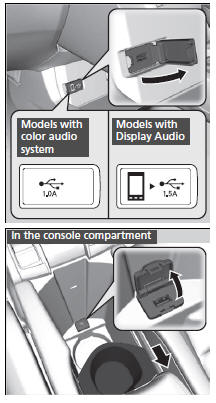
Install the iPod USB connector or the USB flash drive to the front USB port.
Models with color audio system
- The USB port (1.0A) is for playing audio files on a USB flash drive and connecting a cellular phone and charging device.
Models with Display Audio
- The USB port (1.5A) is for charging devices, playing audio files and connecting compatible phones with Apple CarPlay or Android Auto.
In the console compartment*
The USB port (1.0A) is for playing audio files on the USB flash drive and connecting a cellular phone and charging device.
- Move the removable beverage holder tray rearward.
USB Port(s)
- Do not leave the iPod or USB flash drive in the vehicle. Direct sunlight and high temperatures may damage it.
- We recommend using an extension cable with the USB port.
- Do not connect the iPod or USB flash drive using a hub.
- Do not use a device such as a card reader or hard disk drive, as the device or your files may be damaged.
- We recommend keeping your data backed up before using the device in your vehicle.
- Displayed messages may vary depending on the device model and software version.
If the audio system does not recognize the iPod, try reconnecting it a few times or reboot the device. To reboot, follow the manufacturer’s instructions provided with the iPod or visit www.apple.com/ipod.
USB charge (1.5A)
The front USB port can supply up to 1.5A of power.
It does not output 1.5A unless requested by the device.
For amperage details, read the operating manual of the device that needs to be charged.
Turn the ignition switch to ACCESSORY (q or ON  *1 first.
Under certain conditions, a device connected to the port may generate noise in the radio you are listening to.
Test yourself
A quick Honda Civic quiz: every answer comes with an explanation and a link to the manual page.