Second generation (2007-2026)
Using the Touch Screen
In this manual: Second generation (2007-2026)
~1min read
Touch a character or icon on the screen to select it.
►Select Delete to remove the last entered character. ►Select Shift to display accented and upper/lower case characters. ►Select Space to enter a space character.► Select More to display symbols.
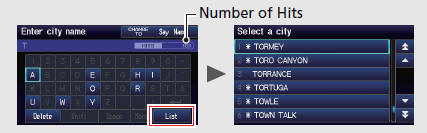
On input search screens, the number of hits in the map database is displayed. Select List to display a list of possible entries.
NOTEYou can also use the joystick to enter information.
On list screens:Scrolling through lists or tabs is limited while the vehicle is moving.
Certain touch screen functions are limited or inoperable while the vehicle is moving. For these functions, use available voice commands or pull over to proceed.Test yourself
A quick Honda Fit quiz: every answer comes with an explanation and a link to the manual page.
Was this page helpful?