Second generation (2007-2026)
Going Home
In this manual: Second generation (2007-2026)
~1min read
1 Press the DEST button.

2 Select Go Home 1.
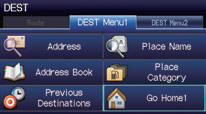
Alternatively, you can say  “Go
Home” from any screen. Your home address is displayed on the Calculate Route screen.
3 Select Set as Dest.
►The following voice commands are available: say “Go Home,” “Go
Home 1,” “Go Home 2.”
►If you have two home addresses stored, saying “Go Home” will select Home
Address 1.
Test yourself
A quick Honda Fit quiz: every answer comes with an explanation and a link to the manual page.
Was this page helpful?