Second generation (2007-2026)
Audio Screen Control
In this manual: Second generation (2007-2026)
~1min read
 AUDIO button (in iPod® mode)
Control the audio screen through the navigation system.
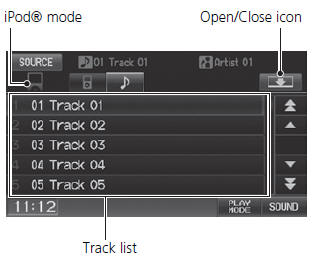
Select a track.
Select the menu tab to change songs in the track list.
The following items are available:
• PLAY MODE Shuffle All: Plays all tracks in
the track list in random order.
 Shuffle Album: Plays all tracks in
the track list in random order by albums.
Each song in an album is played in the right order and only the order of albums is randomized.
 Repeat 1 Track: Repeats the current
track.
Displays/hides the detailed information.
To stop repeat- or shuffle-play, select the current play mode button again.
Test yourself
A quick Honda Fit quiz: every answer comes with an explanation and a link to the manual page.
Was this page helpful?