Be careful when driving with the smart cruise control system as described below.
The smart cruise control system may have limitations in detecting the distance to the vehicle ahead due to road and traffic conditions.
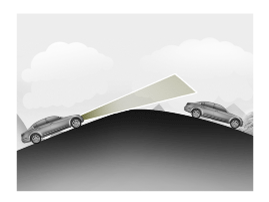
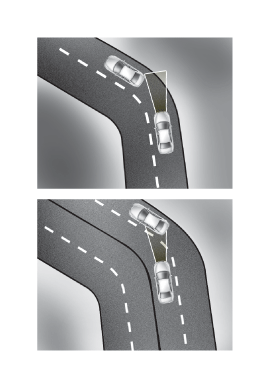
On curves or uphill/downhill grades
On curves or uphill/downhill grades, the smart cruise control system may not detect a moving vehicle in your lane, and your vehicle may accelerate directly to the set speed. Also, vehicle speed may decrease suddenly if a vehicle ahead is recognized. Select an appropriate set speed on curves or uphill/downhill grades and control vehicle speed by depressing the brake pedal as necessary.
Your vehicle speed may be reduced because a vehicle is in an adjacent lane. Depress the accelerator pedal and select an appropriate set speed. Make sure that road conditions allow it.
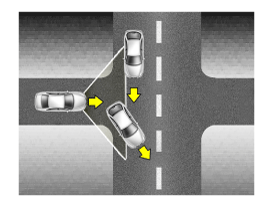
Lane Changes
A vehicle that cuts into your lane from an adjacent lane cannot be recognized by the sensor until it is within the sensor detection range.
Always be careful, because a vehicle that suddenly cuts into your lane may be recognized by the sensor late.
If a vehicle moving in your lane is moving slower than your vehicle, your vehicle speed may decrease to maintain the distance to the vehicle ahead.
If a vehicle moving in your lane is moving faster than your vehicle, your vehicle will maintain the set speed even if the vehicle is within the sensor detection range.
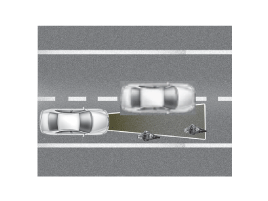
Vehicle Recognition
Even if a vehicle is in the same lane, a vehicle outside the sensor detection range cannot be recognized by the sensor. 1) A small vehicle such as a motorcycle, bicycle, or cultivator. 2) A vehicle offset to one side. 3) A slow-moving vehicle or a vehicle decelerating rapidly. 4) A stopped vehicle. 5) A vehicle with a small rear profile, such as an unloaded trailer.
In the following situations, the vehicle ahead may not be recognized correctly, so control vehicle speed by applying the brake pedal or accelerator pedal as necessary. 1) When the vehicle is tilted upward due to a heavy load in the trunk. 2) When turning the steering wheel. 3) When driving on one side of the lane. 4) When driving in narrow lanes or on curves.
If the smart cruise control remains on (CRUISE indicator illuminated), the smart cruise control may be activated accidentally. Keep the smart cruise control switched off (CRUISE indicator OFF) when the smart cruise control is not in use to avoid unintentional setting of the set speed.
When setting the cruise speed, observe the speed limit on the road.
Use the smart cruise control system only when driving on open roads in good weather. Do not use smart cruise control when it may be unsafe to maintain a constant vehicle speed, such as in heavy or changing traffic, on slippery (rainy, icy, or snowy) or winding roads, or on grades steeper than 6%.
Pay special attention to driving conditions when using the smart cruise control system.
The vehicle cannot be stopped with the smart cruise control system. If an emergency stop is necessary, apply the brakes.
Keep a safe distance according to road conditions and vehicle speed. If the following distance is too close at high driving speed, it is dangerous.
The smart cruise control system cannot recognize a stopped vehicle, pedestrians, or an oncoming vehicle. Always look ahead carefully to prevent unexpected and sudden situations.
The Smart Cruise Control system does not replace safe driving practices. It is only a supplementary function. It is the driver's responsibility to always monitor the vehicle speed and the distance to the vehicle ahead.
Frequent lane changes by vehicles ahead of you may cause a delayed system response, or may cause the system to react to a vehicle that is actually in an adjacent lane. Always look ahead carefully to prevent unexpected and sudden situations.
Your vehicle may accelerate when the vehicle ahead of you disappears. When you are warned that no vehicle ahead has been detected, drive with caution.
When your vehicle is stopped and the vehicle ahead of you changes into the next lane, be careful when your vehicle starts moving, because it may not recognize a stopped vehicle in front of you.
Always watch for pedestrians when your vehicle is maintaining distance from the vehicle ahead.
Always be careful with taller vehicles or vehicles carrying loads that extend beyond the rear of the vehicle.
?
Test yourself
A quick Hyundai Elantra AD quiz: every answer comes with an explanation and a link to the manual page.