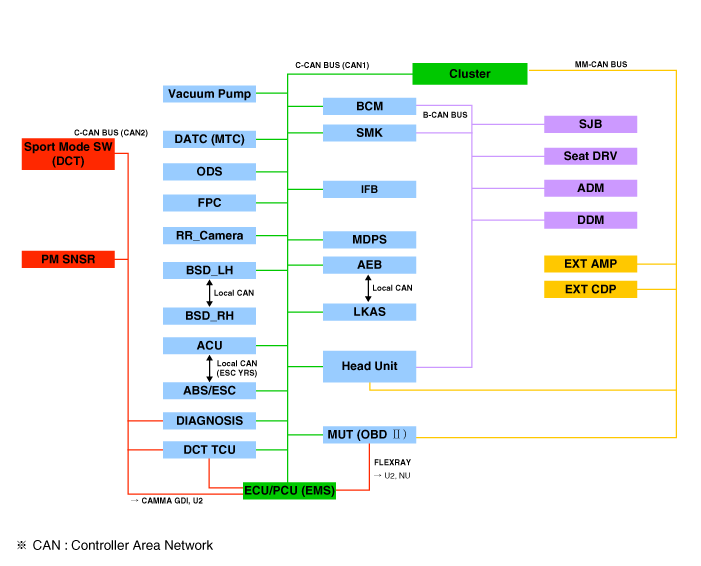
Cluster Variant Coding. Since the vehicle now has more options (ESC, MDPS, SCC, etc.), the instrument cluster displays more information depending on the selected options. For this reason, it is necessary to determine which options the current vehicle has when replacing the instrument cluster. To solve this problem, a training course has been developed. The option required for the vehicle must be performed when replacing the instrument cluster. This is called variant coding. Function
Sound Output. The instrument cluster and external speakers are connected to output various warning sounds and sound effects. If an external amplifier is applied, directional warning is output through the amplifier. [Standard Type][Supervision Type]
Sound
Description and Function (CAN Data Receiver)
Welcome
Welcome (Key Removed and Door Open/Closed, Checked by BCM)
Goodbye
Goodbye (Cluster)
Open Door Warning
Key Reminder (BCM), vehicle speed 5 km/h or less & IGN switch in ACC or IGN position, or engine start, and when vehicle speed is below 5 km/h, or when driver's door is open
Unfastened Seat Belt Warning
Driver Unfastened Seat Belt Warning (BCM)
PAS System Warning
PAS Sensor Malfunction Warning (BCM)
R Gear
PAS Warning When Shifting to R Gear (BCM and SPAS)
Parking Brake
Parking Brake Warning (BCM)
Start Button
SSB Button Warning (SMK)
Rheostat Light Information
Rheostat Warning When Maximum or Minimum Level Is Selected (Cluster)
Smart Key Transmission
Smart Key Not Present Warning (SMK)
Smart Key Warning (SMK)
Smart Cruise
Changeover from Normal Cruise to Smart Cruise (SCC)
Smart Cruise Driving Information
Smart Cruise (SCC) Function Cancellation
Normal Cruise
Changeover from Smart Cruise to Normal Cruise (SCC)
Turn Signal Lamp (Check Mark)
Turn Signal Lamp Warning (BCM)
Turn Signal Lamp (Tock)
Turn Signal Lamp Warning (BCM)
Smart Key Low Battery Voltage
Warning When Driver Presses SSB Button with Smart Key Low Battery (SMK)
EPB Warning
Warning When Changing from Auto Hold to EPB Lock (EPB)
Coolant Temperature Warning
When Engine Temperature Is Above 120 °C
User Settings Mode (USM). The settings can be changed using the switches (MENU, UP, DOWN and OK button). There are many items (such as In/Out Seat Synchronization, Steering Wheel Synchronization, Automatic Door Lock, Automatic Door Unlock, Headlamp Follow-Up, Welcome Light, Welcome Sound, One-Touch Turn Signal, Automatic Reset of Average Fuel Consumption, Brightness and Content Setting) that can be set and adjusted. The signal flow during setting is as follows.
USM settings are configured and transmitted to the BCM.
The BCM transmits the settings via B-CAN to the corresponding modules.
The module completes the setting and transmits the changed setting to the BCM.
The BCM transmits the final settings via C-CAN to the cluster.
The cluster communicates directly with the C-CAN modules.
?
Test yourself
A quick Hyundai Elantra AD quiz: every answer comes with an explanation and a link to the manual page.