Body Electrical System
Smart Key Unit Repair Procedures
In this manual: Body Electrical System
41steps
~246min
4/5difficulty
Done 0 of 41
Removal
Smart Key Unit- Disconnect the negative (-) battery terminal.
- Remove the glove box. (Refer to Body - Glove Box Assembly Upper Cover)
- Remove the smart key unit (A) by disconnecting the connectors (B) and loosening the bolt and nut.
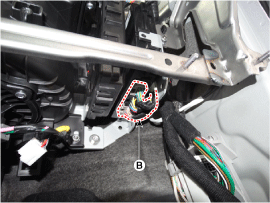
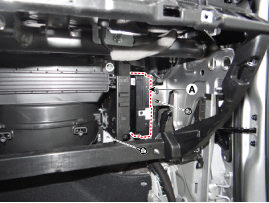
|

- Disconnect the negative (-) battery terminal.
- Remove the console upper cover. (Refer to Body - Floor Console Assembly)
- Remove the interior 1 antenna (B) after loosening the mounting nuts, and disconnect the connector (A).
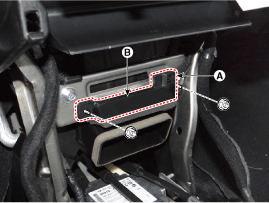
- Disconnect the negative (-) battery terminal.
- Remove the console upper cover (Refer to Body - Floor Console Assembly)
- Remove the interior antenna 2 (B) after loosening the mounting nuts (2EA) and disconnecting the connector (A).

- Disconnect the negative (-) battery terminal.
- Remove the rear cross trim. (Refer to Body - Luggage Compartment Trim)
- Remove the main antenna (B) after disconnecting the connector (A) and loosening the mounting nuts.
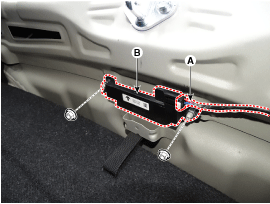
- Disconnect the negative (-) battery terminal.
- Remove the rear bumper cover. (Refer to Body - Rear Bumper Cover)
- Remove the rear bumper antenna (B) after disconnecting the connector (A) and loosening the mounting nuts.
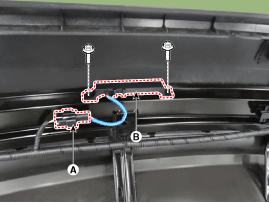
- Disconnect the negative (-) battery terminal.
- Remove the front left wheel guard. (Refer to Body - Front Wheel Guard)
- Remove the buzzer (B) after disconnecting the connector (A).

- Disconnect the negative (-) battery terminal.
- Remove the front door outside handle. (Refer to Body - Front Door Outside Handle)
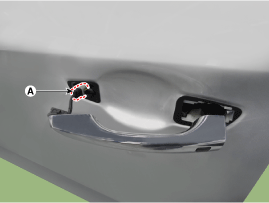
Inspection
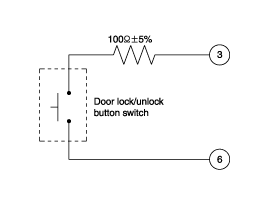
Smart Key Unit (Refer to Smart Key System - Smart Key Diagnostics) Smart Key Switch (Refer to Smart Key System - Smart Key Diagnostics) Antenna (Refer to Smart Key System - Smart Key Diagnostics) Outside Door Handle- Disconnect the front door outside handle connector (A).

- Check the continuity of the circuit between terminals No. 3 and No. 6.

No Description 1 Door Antenna (+) 2 Pocket LED Light (+) 3 Door Lock/Unlock Button 4 Door Antenna (-) 5 Pocket LED Light (-) 6 Door Lock/Unlock Button Switch Ground
Installation
Smart Key Unit- Install the smart key unit.
- Install the smart key unit mounting bolts and connect the connector.
- Install the glove box.
- Connect the negative (-) battery terminal and check the smart key system.
- Install the interior 1 antenna.
- Install the center airbag panel.
- Connect the negative (-) battery terminal and check the smart key system.
- Install the interior 2 antenna.
- Install the rear console assembly.
- Connect the negative (-) battery terminal and check the smart key system.
- Roof Rack Antenna.
- Install the rear cross trim.
- Connect the negative (-) battery terminal and check the smart key system.
- Install the rear bumper antenna.
- Install the rear bumper cover.
- Connect the negative (-) battery terminal and check the smart key system.
- Install the outside handle.
- Install the front door outside handle.
- Connect the negative (-) battery terminal and check the smart key system.
Test yourself
A quick Hyundai Elantra AD quiz: every answer comes with an explanation and a link to the manual page.
Was this page helpful?