Steering Wheel Audio Controls
CAUTION
Do not operate the audio remote control buttons simultaneously.
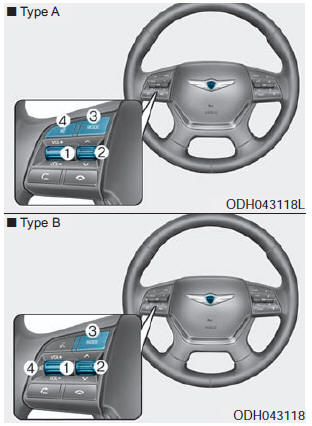
VOLUME (VOL +/-) (1)
- Push the VOLUME lever up to increase the volume.
- Push the VOLUME lever down to decrease the volume.
SEEK/PRESET ( ) (2)
If the SEEK/PRESET lever is pushed up or down and held for 0.8 seconds or more, it will operate in the following modes:
RADIO mode
It will operate as the AUTO SEEK button. It will seek until you release the button.
MEDIA mode
It will function as the FF/REW button.
If the SEEK/PRESET lever is pushed up or down, it will operate in the following modes:
RADIO mode
It will function as the PRESET STATION UP/DOWN button.
MEDIA mode
It will function as the TRACK UP/DOWN button.
MODE (3)
Press the MODE button to select Radio, XM, Disc or AUX.
MUTE ( ) (4)
- Press the MUTE button to turn off the sound.
- Press the MUTE button again to restore the sound.
✽ NOTICE
Detailed information is described in the separately supplied manual.
Test yourself
A quick Hyundai Genesis DH quiz: every answer comes with an explanation and a link to the manual page.