Head-Up Display (HUD)
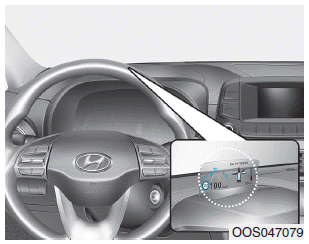
The Head-Up Display is a transparent display that projects some information from the instrument cluster and navigation onto the windshield in the driver's line of sight.
Precautions When Using the Head-Up Display
It may be difficult to read the information on the Head-Up Display in the following situations.
- The driver is not seated correctly in the driver's seat.
- The driver is wearing polarized sunglasses.
- An object is placed over the HUD cover.
- The vehicle is driving on a wet road.
- An inappropriate lighting device is installed inside the vehicle, or light is falling on the vehicle from outside.
- The driver is wearing glasses.
- The driver is wearing contact lenses.
If the information on the Head-Up Display is difficult to read, adjust the display angle or brightness level on the windshield in the User Settings mode. For more details, refer to the "LCD Display" section in this chapter.
WARNING
- Do not attach stickers or accessories to the HUD or the windshield.
- Do not adjust the HUD shutter and combiner directly by hand.
- The image may be invisible due to fingerprints. In addition, excessive force applied during operation may damage the display.
- Do not place any objects near the HUD. Interference with such objects during activation may affect operation or damage the display.
- Do not place drinks near the HUD. If liquid leaks into the HUD, the display may be damaged.
- Do not place any objects on the HUD. In addition, attaching anything (a sticker, etc.) to the combiner may distort the image visibility.
- Do not allow strong light to strike the combiner. This may damage the combiner and internal components.
- Do not place any objects on, inside, or near the display, regardless of whether the HUD is open or closed. Also do not attach any objects to the system component or insert anything inside the system.
- Use a soft cloth to clean the HUD. Do not use an organic solvent, detergent, or polishing cloth.
- For safety, be sure to stop the vehicle before adjusting the settings.
CAUTION
- When opening or closing the HUD, noise from the motor and gear mechanism may occur.
- When adjusting the HUD image height, noise from the motor and gear may occur.
- * HUD stands for Head Up Display.
Head-Up Display ON/OFF
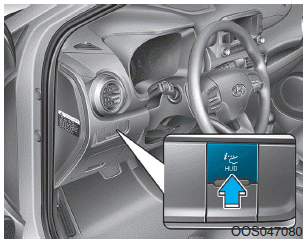
With the engine running, you can turn the HUD on/off by pressing the HUD button on the crash pad.
With the engine off, the HUD automatically closes when the door is locked with the remote or smart key.
If your vehicle has a smart key, the HUD automatically closes when the door is locked by pressing the button on the outside door handle.
If the engine is off and the door is not locked, the HUD will close automatically after approximately 5 minutes.
Head-Up Display Information
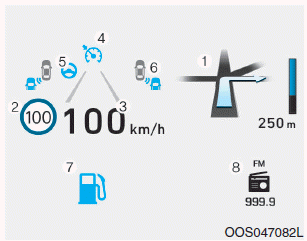
1. Turn By Turn (TBT) Navigation Information
2. Road Signs
3. Speedometer
4. Cruise Control Set Speed
5. Lane Keeping Assist (LKA) Information (if equipped)
6. Blind-Spot Collision Warning (BCW) Information (if equipped)
7. Warning Lights
8. Audio/Video Information
Information
If you select Turn By Turn (TBT) navigation information as the HUD content, Turn By Turn (TBT) navigation information will not be displayed on the LCD display.
Windshield Display Settings
On the LCD, you can change the Head-Up Display settings as follows.
- Display Height
- Rotation
- Brightness
- Content Selection
- Speedometer Size
- Speedometer Color
Test yourself
A quick Hyundai Kona quiz: every answer comes with an explanation and a link to the manual page.