Heating, Ventilation, and Air Conditioning
Defog Door Actuator
In this manual: Heating, Ventilation, and Air Conditioning
11steps
~66min
3/5difficulty
Done 0 of 11
Description and Operation
Description
The auto defog sensor is installed on the windshield. The sensor detects moisture and sends a signal so that air is blown to prevent fogging. The A/C control unit receives the signal from the sensor and removes the moisture to eliminate fogging by controlling the intake actuator, A/C, auto defog actuator, blower motor speed, and mode actuator.Components and Component Location
Component Location
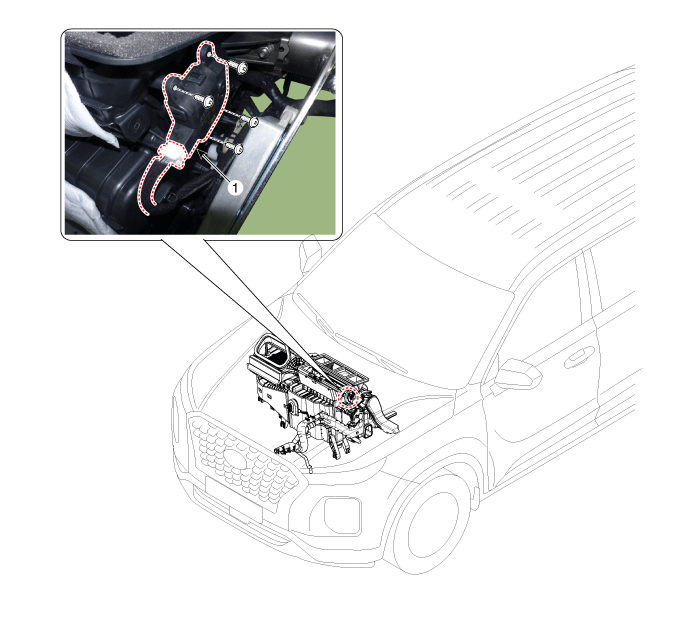
| 1. Auto defog door actuator |
Repair Procedures
Inspection
- Turn the ignition off.
- Disconnect the auto defog actuator connector.
- Make sure the auto defog door actuator operates to the open position when 12 V is applied to terminal 3 and terminal 4 is grounded. Make sure the auto defog door actuator operates to the closed position when connected in reverse.
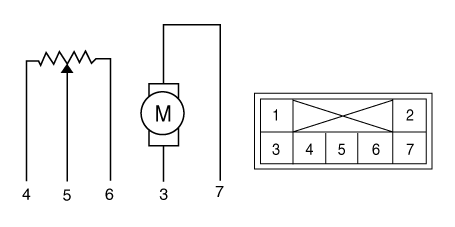
1. -
2. -
3. DEF (Closed)
4. DEF (Open)5. Sensor power (+5V)
6. Feedback signal
7. Sensor ground - Connect the defogger actuator connector.
- Turn the ignition on.
- Check the voltage between terminals 5 and 4.
Specification
- It will display the current position of the actuator. to the controls.
Door Position Voltage (V) Fault Detection Anti-Fog ON (Open) 0,5 ± 0,15 Low voltage: 0.7 V or less Anti-Fog OFF (Close) 4,7 ± 0,15 High voltage: 4.9 V or less - If the measured voltage does not meet the specification, check operation by replacing the existing auto defog actuator with a new genuine part. Then determine whether replacement of the auto defog actuator is required or not.
Replacement
- Disconnect the negative (-) battery terminal.
- Remove the driver airbag module assembly. (Refer to Body - "Driver Airbag Module Assembly")
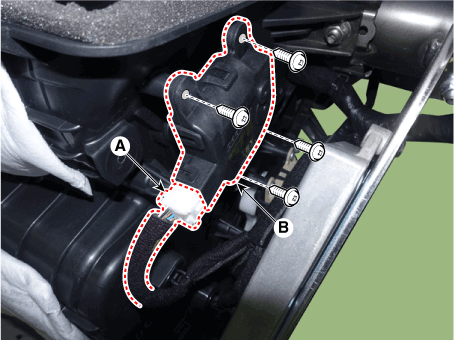
- Press the locking pin, disconnect the connector (A), then loosen the mounting screws and remove the auto defog door actuator (B).
- Install in the reverse order of removal.
Test yourself
A quick Hyundai Palisade quiz: every answer comes with an explanation and a link to the manual page.
Was this page helpful?