Steering Wheel Audio Controls (if equipped)
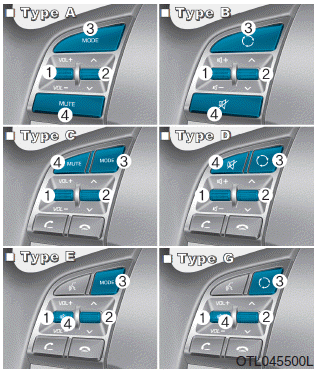
The steering wheel audio controls allow you to operate the car audio system safely while driving.
 NOTICE
Do not operate the steering wheel audio controls simultaneously.
VOLUME (VOL +/-) (1)
- Turn the VOLUME knob up to increase the volume.
- Turn the VOLUME knob down to decrease the volume.
AUTO SEEK/ PRESETS (  /
 ) (2)
If you turn the AUTO SEARCH/PRESETS knob for at least 0.8 seconds, the function operates as follows.
RADIO mode
Auto search. Searches until you release the scroll wheel.
MEDIA Mode
Fast forward/rewind.
If you turn the AUTO SEARCH/PRESETS knob for 0.8 seconds or less, the function operates as follows.
RADIO mode
This mode operates in the same way as the PRESET STATION UP/DOWN button.
MEDIA Mode
This mode operates in the same way as the TRACK UP/DOWN button.
MODE ( ) (3)
Press the MODE button to select radio, CD, or auxiliary input.
MUTE ( ) (if equipped)
- Press this button to mute the sound.
- Press the button again to restore the sound.
Information
You will find detailed information on the audio control buttons on the following pages of this chapter.
Test yourself
A quick Hyundai Tucson quiz: every answer comes with an explanation and a link to the manual page.