MP3 File Information
• Supported Audio Formats
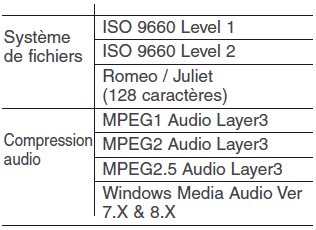
❈ File formats that are incompatible with the above formats cannot be recognized or played back, and file names or other information may not be displayed.
• Support for compressed files
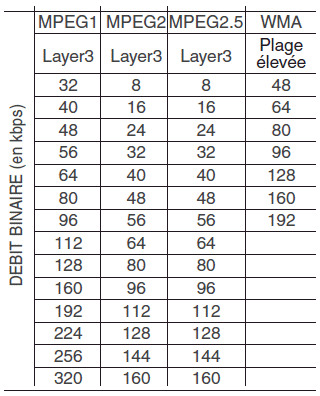
1. Supported bitrates (kbps)
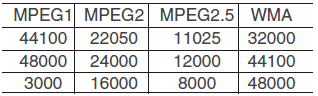
2. Sampling frequencies (Hz)
- For MP3/WMA compressed files, differences in sound quality may be noticeable depending on the bitrate. The best sound quality is achieved with a high bitrate.
- This device recognizes only files with the MP3/WMA extensions. Other file extensions may not be recognized.
3. Maximum number of recognizable folders and files
- Folders: 255 folders (CD), 2000 folders (USB)
- Files: 999 files (CD), 6000 files (USB)
❈ The number of recognizable folder levels is not limited.
• Language support (Unicode support)
1. English: 94 characters
2. Special characters and symbols: 986 characters.
❈ Languages other than Korean and English are not supported (including Chinese).
3. Displayed text (based on Unicode)
- File name: up to 64 characters (in English).
- Folder name: up to 32 characters (in English).
❈ When using the scroll function, the full file name will be displayed if the name is too long to show at once.
• Disc type compatibility
1. MIX CD playback: Play an audio CD, then a compressed CD.
2. EXTRA CD playback: Play an audio CD, then a compressed CD.
3. Multi-session CD playback:
Playback in session order
- MIXED CD: a type of CD on which MP3 and audio files are recognized. The same disc.
- Multi-session CD: a type of CD containing more than two sessions. Unlike EXTRA CDs, multi-session CDs are recorded by session and have no restrictions related to support.
• Precautions when recording CDs
1. Except for multi-session discs, select the option to close the session before creating the disc. If the session is not closed, the device may need to check whether the session is closed (approximately 25 seconds).
(Additional loading time may be required depending on the number of folders or files.)
2. Changing MP3/WMA file extensions, or changing other file extensions to MP3/WMA, may cause the device to malfunction.
3. When naming MP3/WMA files, do not use languages other than Korean and English. Languages other than Korean and English are not supported and are displayed as blank.
4. Unauthorized use or copying of music files is prohibited by law.
5. Prolonged use of non-standard CD-R/CD-RW discs and/or discs that do not meet applicable specifications may cause the product to malfunction.
6. Unauthorized use or copying of MP3/WMA files is prohibited by law.
Test yourself
A quick Hyundai Tucson quiz: every answer comes with an explanation and a link to the manual page.