Engine Electrical System
Battery Sensor Repair Procedures
In this manual: Engine Electrical System
5steps
~30min
2/5difficulty
Done 0 of 5
Removal
- Disconnect the negative (-) battery cable.
- Disconnect the battery sensor connector (A).
- Disconnect the battery negative (-) cable by loosening the bolt (B).
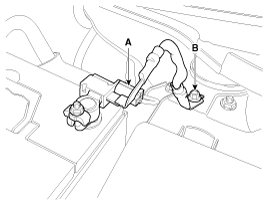
Installation
- Install in the reverse order of removal. Battery sensor cable mounting bolt: 21.6 ~ 32 N·m Battery negative (-) terminal nut tightening: 3.9 ~ 5.9 N·m
If a battery sensor signal malfunction occurs, inspect the vehicle for parasitic current draw in advance, because the sensor will behave abnormally when parasitic current exceeds 100 mA. (Refer to Inspection of Vehicle for Parasitic Current Draw)

- For a vehicle equipped with a battery sensor, be careful not to damage the battery sensor when replacing or recharging the battery.
- When replacing the battery, it must be the same type, capacity and brand as the one originally installed in your vehicle. If a battery of a different type is installed, the battery sensor may recognize the battery as abnormal.
- When installing the ground cable to the negative battery terminal, tighten the clamp to the specified torque. Excessive tightening torque may damage the internal circuit of the printed circuit board and the battery terminal.
- When charging the battery, ground the negative terminal of the auxiliary battery to the vehicle body.
Battery Sensor Recalibration Procedure
After reconnecting the battery negative cable, the AMS function does not operate until the system stabilizes, for about 4 hours. If the battery negative (-) cable is disconnected from the battery during repair of a vehicle equipped with the AMS function, the battery sensor recalibration procedure must be performed after the repair work is completed.- Turn the ignition switch ON and OFF.
- Park the vehicle for approximately 4 hours with the hood closed and all doors closed.
Test yourself
A quick Hyundai Tucson LM quiz: every answer comes with an explanation and a link to the manual page.
Was this page helpful?