Messages on the Cluster Display
Shift to P (with Smart Key)
This message appears if the Push Button Start ignition switch is pressed to the OFF position without shifting to the P (Park) position.
In this case, the Push Button Start ignition switch changes to the ACC position.
Low Smart Key Battery (with Smart Key)
When the Push Button Start ignition switch is pressed to the OFF position, a message may appear indicating that the smart key internal battery is discharged. Replace the smart key battery.
Press the brake pedal to start the engine (with Smart Key)
This message appears if the Push Button Start switch is pressed several times without depressing the brake pedal.
Start the vehicle by depressing the brake pedal, then press the Push Button Start switch.
Key Not in Vehicle (if equipped with Smart Key)
This message appears if the Smart Key is not in the vehicle when you have exited the vehicle with the ENGINE START/STOP button in the ON or ACC position.
Always turn off the engine before leaving your vehicle.
Key Not Detected (if equipped with Smart Key)
This message appears if the Smart Key is not detected when the ENGINE START/STOP button is pressed.
Press the START button again (if equipped with Smart Key)
If you cannot start the vehicle after the ignition switch button has been pressed, try to start the engine by pressing the ENGINE START/STOP button again.
If the warning message appears every time you press the START/STOP button, have the vehicle inspected by an authorized HYUNDAI dealer.
Press the START button with the key (if equipped with Smart Key)
This message appears and the immobilizer indicator flashes if you press the ignition switch button while the warning message "Key Not Detected" is displayed.
Check the BRAKE SWITCH fuse (if equipped with Smart Key)
This message appears if the brake switch fuse is disconnected.
Replace the fuse before starting the engine.
If this is not possible, start the engine by pressing and holding the ENGINE START/STOP button for 10 seconds in the ACC position.
Shift to P or N to start the engine (if equipped with Smart Key)
This message appears if you try to start the engine in any position other than P (Park) or N (Neutral).
Information
You can start the engine with the shift lever in N (Neutral). However, for your safety, always start the engine with the shift lever in P (Park) and your foot firmly on the brake pedal.
Battery Discharge Due to External Electrical Devices (if equipped)
This message appears if the vehicle battery voltage is low or if a current draw is detected that may discharge the vehicle battery.
Do not connect any external electronic devices to the battery system, or the battery may discharge.
If this message appears in the cluster and no external electronic devices are connected to the vehicle, have the vehicle inspected by an authorized HYUNDAI dealer.
Door, Hood, and Trunk Open Warning
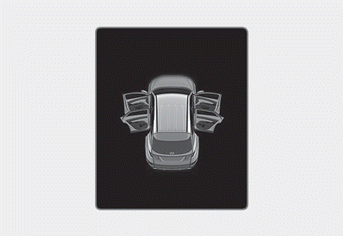
This warning appears if any door, the hood, or the tailgate remains open. The warning indicates which door is open on the cluster display.
WARNING
Before driving, make sure that the doors, hood, and tailgate are fully closed.
Also check that the door, hood, and tailgate open indicator lights or messages are not displayed on the instrument cluster.
Sunroof Open Indicator (if equipped)
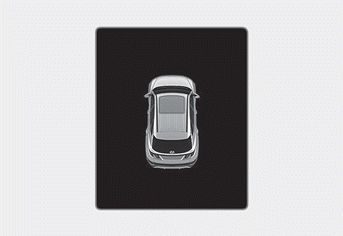
This warning appears if you turn off the engine with the sunroof open.
Close the sunroof securely before leaving your vehicle.
Low Tire Pressure
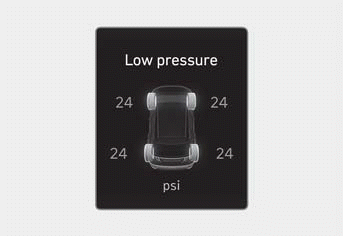
This warning message appears if the tire pressure is low. The corresponding tire on the vehicle illuminates.
For more information, refer to the "Tires. Tire Pressure Monitoring System (TPMS)" section in chapter 8.
Lights
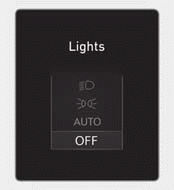
This indicator shows which exterior light is selected with the light control.
You can activate or deactivate the Wiper/Light Display function from the settings menu in the instrument cluster or the infotainment system.
Select:
- User Settings > Cluster > Wiper/Light Display (for cluster type)
- Settings > Vehicle > Cluster > Content Selection > Wiper/Light Display (for infotainment system type)
Wiper Arm
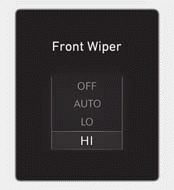
This indicator shows which wiper speed is selected with the wiper control.
You can activate or deactivate the Wiper/Light Display function from the settings menu in the instrument cluster or the infotainment system.
Select:
- User Settings > Cluster > Wiper/Light Display (for cluster type)
- Settings > Vehicle > Cluster > Content Selection > Wiper/Light Display (for infotainment system type)
Information
The infotainment system may change after a software update. For more information, refer to the infotainment system user's manual and quick reference guide.
Low Washer Fluid (if equipped)
This message appears if the washer fluid level in the reservoir is almost empty. Fill the washer fluid reservoir.
Low Fuel
This message appears if the fuel tank is almost empty.
When this message appears, the low fuel level indicator on the instrument panel illuminates.
Refuel as soon as possible.
Low engine oil level
This warning message appears when the engine oil level should be checked.
Slowly add the recommended oil through the funnel.
Refer to "Recommended Lubricants and Capacities" in chapter 10.
Do not overfill the engine oil. Make sure the oil level does not exceed the F (Full) mark on the dipstick.
WARNING
When the engine oil level warning message appears, check whether the engine oil was changed according to the maintenance schedule in chapter 9. If it was not, the engine oil must be changed first.
Information
After refueling, if you drive approximately 18-37 miles (30-60 km) after the engine warm-up is completed, the warning message should disappear. If the warning message continues to be displayed, have the vehicle inspected by an authorized HYUNDAI dealer as soon as possible.
Engine Overheated
This message appears when the engine coolant temperature is above 248 °F (120 °C). The engine is overheated and may be damaged.
If your vehicle overheats, refer to the "Overheating" section in chapter 8.
Check Headlamp
This message appears if the headlights are not operating properly. Replace the burned-out bulb with a new one of the same rating.
Check Turn Signal
This message appears if the turn signal light is not operating properly.
Replace the burned-out bulb with a new one of the same rating.
Check Headlamp LED (if equipped)
This message appears if there is a problem with the LED headlight. Have the vehicle inspected by an authorized HYUNDAI dealer.
Test yourself
A quick Hyundai Tucson LM quiz: every answer comes with an explanation and a link to the manual page.