Body Electrical System
Description and Operation
In this manual: Body Electrical System
~2min read
Function
Bluetooth Audio System
Bluetooth You can use a Bluetooth device in the vehicle to make hands-free phone calls or to stream music through the vehicle speakers (via this head unit). This head unit supports HFP, A2DP and AVRCP connections.Advanced Audio Distribution Profile (A2DP)
This profile defines the high-quality audio (stereo or mono) that can be transmitted from one device to another via a Bluetooth connection. For example: streaming music from a mobile phone to a wireless headset or car audio.Audio/Video Remote Control Profile (AVRCP)
This profile provides a standard interface for controlling TVs, Hi-Fi equipment, etc., allowing one remote control (or other device) to control all audio/video equipment the user has access to. It can be used together with A2DP or VDP.Hands-Free Profile (HFP)
This is commonly used so that in-car hands-free kits can communicate with mobile phones in the vehicle.Mobile Phone Notes
Some functions (for example, starting voice recognition) are not supported by all mobile phones. We cannot guarantee that all described functions will be supported by all Bluetooth mobile phones.New Device
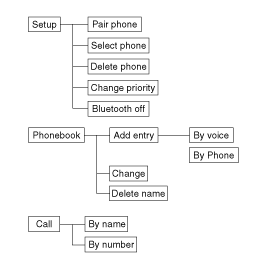
This function allows you to add a new phone to the head unit's Bluetooth device list. Up to 5 devices can be added to the list. If the list is full, the oldest device will be replaced by the newly added Bluetooth device based on the date of last pairing. Activating Voice Recognition- The voice recognition feature built into the Bluetooth system can be activated under the following conditions: - Button activation: The voice recognition system will be active when the
 button is pressed and after the beep. - Active listening: The voice recognition system will be active for the time the voice recognition system has requested a response from the user.
- The system can recognize single digits from zero to nine. Numbers greater than ten are not recognized.
- If a command is not recognized, the system will announce "Sorry" or "No input" through the speaker. (No response)
- The system will cancel voice recognition mode in the following cases: When the button is pressedbutton and "cancel" is spoken after the beep. If you do not make a call and press the button
 button. When voice recognition has failed 3 times in a row.
- At any time, if you say "help", the system will tell you which commands are available.
Test yourself
A quick Hyundai Tucson LM quiz: every answer comes with an explanation and a link to the manual page.
Was this page helpful?