Smart Key
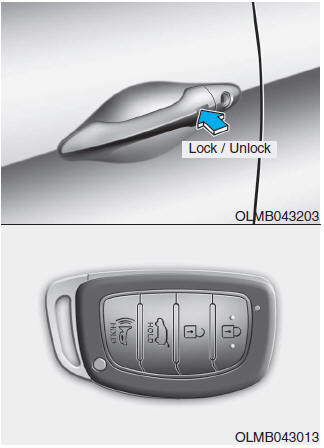
To lock the doors, press the button on the outside door handle while carrying the smart key, or press the door lock button on the smart key.
Press the button on the outside door handle while carrying the smart key with you, or press the door unlock button on the smart key; the driver's door will unlock. If you press the door unlock button on the smart key again within four seconds, all doors will unlock.
When the doors are unlocked, they can be opened by pulling the door handle.
When closing a door, push the door with your hand. Make sure the doors are securely closed.
✽ NOTICE
You can set the system to the central door unlock mode (unlock all doors with one press of the unlock button). If you want to use this function, perform the following: Changing the unlock mode (two-stage unlock mode ↔ central door unlock mode)
The unlock mode alternates each time the lock and unlock buttons on the smart key are pressed simultaneously for 4 seconds or more. The hazard warning lights flash four times to indicate the mode change is complete.
✽ NOTICE
- In cold and humid climates, the door lock and door mechanisms may not operate properly due to freezing conditions.
- If the doors are locked/unlocked repeatedly in succession with either the vehicle key or the door lock switch, the system may temporarily stop operating to protect the circuit and prevent damage to system components.
Test yourself
A quick Hyundai Tucson LM quiz: every answer comes with an explanation and a link to the manual page.