KNOW YOUR VEHICLE
Getting Started
In this manual: KNOW YOUR VEHICLE
3steps
~18min
2/5difficulty
Done 0 of 3
 The VR button is used to activate / deactivate your voice recognition system.
Helpful tips for using Voice Recognition:
- Reduce background noise. Wind noise and conversations with passengers are examples of noise that may affect recognition.
- Speak clearly at a normal pace and volume while facing straight ahead.
- Each time you give a voice command, first press the VR button, wait for the beep, then say the voice command.
- You can interrupt a help message or system prompt by pressing the VR button and saying a voice command within the current category.
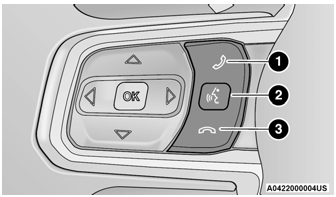
Disable Voice Control Buttons
- Press to start or answer a phone call, and send or receive text messages
- Press the voice recognition button to activate the radio, media, and climate functions.
- Press to end a call.
Test yourself
A quick Jeep Wrangler quiz: every answer comes with an explanation and a link to the manual page.
Was this page helpful?