Body Electrical System
Audio Remote Control Repair Procedures
In this manual: Body Electrical System
16steps
~96min
4/5difficulty
Done 0 of 16
Inspection
[Steering Wheel Remote Control Switch]- Check the audio remote control switch for resistance between the terminals in each switch position.

Switch Connector
TerminalResistance
(±5%)Seek 2-7 430 Ω Seek down 2-7 1.1 kΩ Mode 2-7 2.11 kΩ Mute 2-7 3.11 kΩ Volume Up 2-7 4.61 kΩ Volume Down 2-7 6.81 kΩ
[Cruise + Voice (RH)]Switch Connector
TerminalResistance
(±5%)CANCEL 2-7 430 Ω SET 2-7 1.1 kΩ RESUME 2-7 2.11 kΩ Cruise 2-7 3.11 kΩ Smart Cruise 2-7 4.61 kΩ Voice 2-7 6.81 kΩ
[Bluetooth (LH)]Switch Connector
TerminalResistance
(±5%)CALL 2-5 18.91 kΩ CANCEL 2-5 40.91 kΩ
[Trip (RH)]Switch Connector
TerminalResistance
(±5%)Trip 2-5 330 Ω Reset 2-5 550 Ω
Removal
[Steering Wheel Remote Control Switch]- Remove the driver airbag module. (Refer to Restraint System - "Driver Airbag Module (DAB) and Clock Spring")
- Remove the steering wheel. (Refer to Steering System - "Steering Column and Shaft")
- Remove the steering wheel cover (A) after loosening the screws.
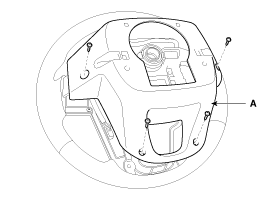
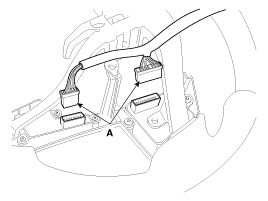
- Disconnect the steering wheel remote control switch connector (A). [LH - Audio]

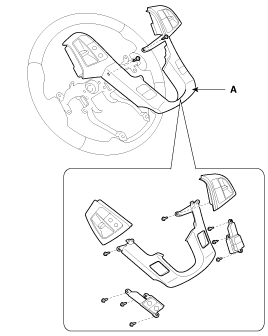
- Remove the steering wheel remote control switch (A) after loosening the mounting screws.
- Remove the rear seat armrest. (Refer to Body – "Rear Seat")
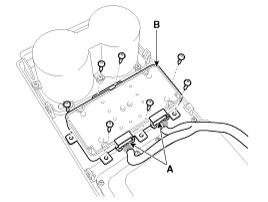
- Disconnect the connector (A) after loosening the mounting screws.

- Remove the rear seat remote control switch (B) after loosening the mounting screws and disconnecting the connector (A).
Installation
[Steering Wheel Remote Control Switch]- Install the steering wheel remote control switch.
- Install the steering wheel column cover.
- Install the steering wheel.
- Install the steering wheel remote control switch and the airbag connector.
- Install the driver airbag module.
- Install the rear seat remote control switch.
- Install the rear seat armrest cover.
- Install the rear seat.
Test yourself
A quick Kia Cadenza VG Owner's Manual quiz: every answer comes with an explanation and a link to the manual page.
Was this page helpful?