Cargo area cover
Use the practical cargo area cover to discreetly shield stored items and luggage in the trunk from public view in your Kia EV2.
Insert the ends of the cargo security screen directly into the side mounting hooks as illustrated.
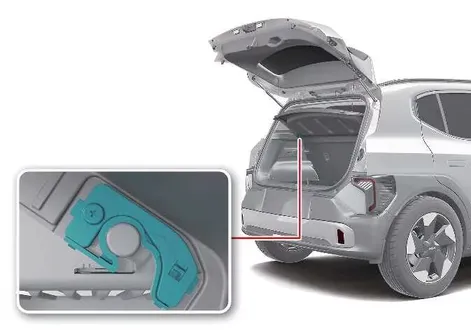
Pull out and hold the cargo screen retention strap, then hook it securely onto the upper anchor post located just beneath the rear glass.

Removal of the cargo security screen is performed by following the assembly steps in reverse order.
WARNING
Do not place heavy items or loose objects on top of the cargo area cover. Unsecured items resting on the cover can be hurled violently around the cabin during a sudden collision, sharp turn, or heavy braking event, potentially injuring vehicle passengers.
CAUTION
Since placing heavy weight on the cargo area cover can cause permanent structural damage or bending, never stack luggage or cargo directly on top of the shade while it is deployed.