USB charger
The high-efficiency USB charger allows you to quickly recharge the batteries of small mobile electronic devices using a standard USB connection cable in your Kia EV2.
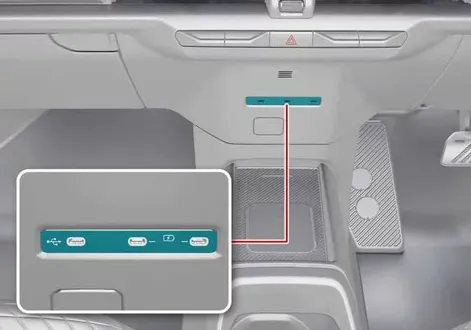 |
 |
You can recharge your connected electronic devices whenever the vehicle is in POWER ON position or when the READY indicator light is active on the instrument cluster.
You can easily monitor the real-time battery charging progress directly on the screen of your electronic device.
Always disconnect the USB cable from the charging port once your device has finished charging.
Rated output specifications: 9.0 V / Max 3.0 A
Your smartphone or tablet PC may naturally get warmer during the rapid recharging process. This mild temperature increase does not indicate any malfunction with the vehicle's charging system.
A smartphone or tablet utilizing a non-standard or proprietary recharging method may fail to charge properly. In such cases, use the dedicated manufacturer-exclusive charger designed for your device.
The USB charging terminal is engineered exclusively for powering and recharging devices. Do not attempt to use this charging terminal to connect external audio storage devices or play media through the vehicle's infotainment system.
NOTE
Only use the USB charger when the vehicle system is fully operational. Using the USB charging ports for prolonged periods while the vehicle is turned off could cause the 12V auxiliary battery to discharge.
To prevent internal damage to the USB charging hardware:
Do not insert foreign metallic objects or spill any liquids into the power outlet or port, as this may ruin the internal charging terminals.
Do not connect external devices with an operating current demand exceeding 3,000 mA (3.0 A).
TIP
Device charging might not function correctly when using third-party USB Type-C to USB Type-A adapters or signal converters.