Audio system
Head unit
In this manual: Audio system
~1min read
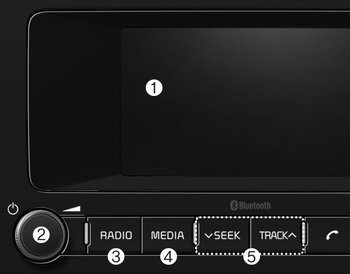
(1) LCD screen
- Tap the screen to select a button.
(2) POWER/VOL knob
- Turn to adjust the volume.
- Press to turn the device on or off.
(3) RADIO
- Start FM, AM or DAB Radio*. * if equipped
(4) MEDIA
- Select USB, iPod®, Bluetooth® Audio, AUX or My Music.
- Display the media menu when two or more media are connected or when the [MEDIA] button is pressed in media mode.
(5) SEEK/TRACK
- Search for frequencies in radio mode.
- Change the current song in media mode.
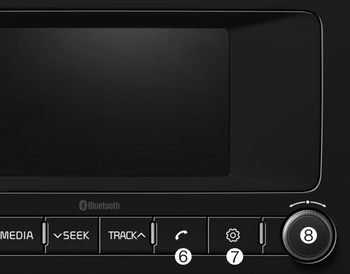
■ Type 1
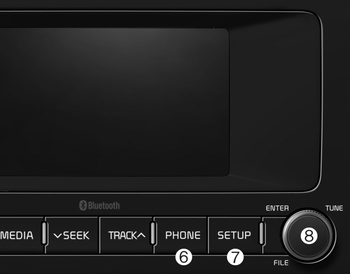
■ Type 2
(6) PHONE
- Start Bluetooth® Phone mode.
(7) SETUP
- Access Display, Sound, Date/Time, Phone, System, Screensaver (Screen Saver) and Display Off settings.
(8) TUNE knob
- Turn to navigate through the stations/ songs list.
- Press to select an item.
Was this page helpful?