Audio system
Steering wheel remote control
In this manual: Audio system
~2min read
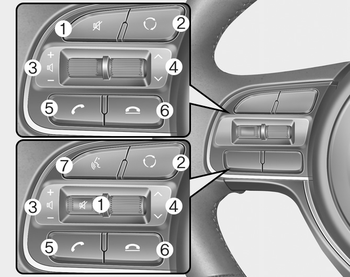
❈ The actual features in the vehicle may differ from the illustration.
(1) MUTE
- Press to mute audio output.
(2) MODE
- Press the button to change the mode in the following order: Radio ➟ Media.
(3) VOLUME
- Press to adjust the volume. (4) UP/DOWN
- Press the button in radio mode to search Presets.
- Press and hold the button in radio mode to search frequencies.
- Press the button in media mode to change the current song.
- Press and hold the button in media mode to quick search through songs.
(5) CALL
- Pressing the button
- If not in Bluetooth® Handsfree mode or receiving a phone call
First press: Display Dial Number screen
Second press: Automatically display the most recently Dialed Call number
Third press: Dial the phone number entered
- Press in the Incoming Call notification screen to accept the phone call.
- Press in Bluetooth® Handsfree mode to switch to the waiting call. - Pressing and holding the button
- If not in Bluetooth® Handsfree mode or receiving a phone call, the most recently Dialed Call number is dialed.
- Press in Bluetooth® Handsfree mode to transfer the call to your cell phone.
- Press in cell phone mode to switch to Bluetooth® Handsfree mode.
(6) END
- Press in Bluetooth® Handsfree mode to end the phone call.
- Press in the incoming call screen to reject the call.
(7) VOICE
- Pressing the button
- If voice recognition is not active: Start voice recognition.
- During the notification message after voice recognition is started: The notification message is skipped, and voice command standby mode is activated.
- While standing by for a voice command: Extend voice command standby time. - Pressing and holding the button: End voice recognition.
Was this page helpful?