Features of your vehicle
Instrument cluster (Kia Niro EV)
In this manual: Features of your vehicle
~2min read
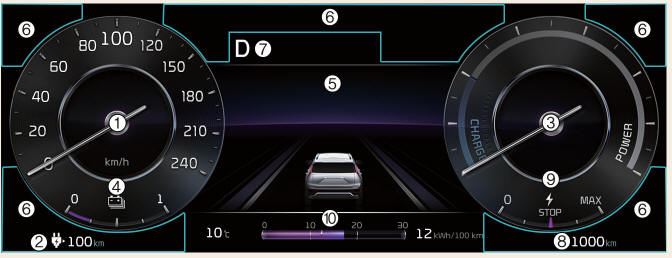
- Speedometer
- MPH, km/h
- The speed of the vehicle in kilometers per hour (km/h) or miles per hour (mph).
- Distance to empty
- Estimated distance the vehicle can be driven with the remaining electric energy.
- Power/Charge gauge
- The energy consumption rate of the vehicle and the charge/discharge status of the regenerative brakes.
- Battery SOC (State of Charge) gauge
- Charging status of the high voltage battery.
- LCD display
- Refer to "LCD display"
- Warning and indicator lights
- Refer to "Warning and indicator lights"
- Reduction gear shift indicator
- The indicator displays which gear is selected.
- Odometer
- The odometer indicates the total distance that the vehicle has been driven.
- Regenerative braking level indicator
- Refer to "Regenerative braking system"
- Electric energy economy
- Refer to "Trip computer mode"
CAUTION
- The information is displayed after getting information from a weather information provider via GPS. Depending on conditions of GPS reception, the information may be different from the current weather in your area.
- Be careful while driving as dynamicthemed animation effects can distract the driver and lead to unexpected accidents.
NOTICE
- When the remaining battery is lower than 10% for the high voltage battery, the vehicle speed is limited and then eventually the vehicle will turn OFF.
Charge the vehicle immediately.
- If the vehicle is not on level ground or the battery power has been interrupted, the distance to empty function may not operate correctly.
- The distance to empty may differ from the actual driving distance as it is an estimate of the available driving distance.
- The distance to empty may vary significantly based on driving conditions, driving habits, and condition of the vehicle.
- Use a clean soft microfiber cloth to gently wipe any finger prints off the touch screen.
- The instrument cluster for the righthand drive vehicle may be on the opposite side show differently.
Was this page helpful?