Body Electrical System
eCall Unit Repair Procedures
In this manual: Body Electrical System
33steps
~198min
5/5difficulty
Done 0 of 33
Removal
eCall module- Disconnect the negative (-) battery terminal.
- Remove the glove box housing. (Refer to Body - "Glove Box Housing")
- Disconnect the connectors from the eCall module (A).
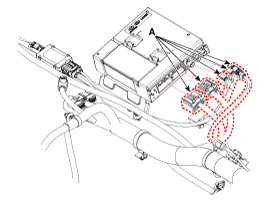
- Loosen the mounting nuts (B), then remove the eCall unit (A).
- Disconnect the negative (-) battery terminal.
- Remove the driver airbag module assembly. (Refer to Body - "Driver Airbag Module Assembly")
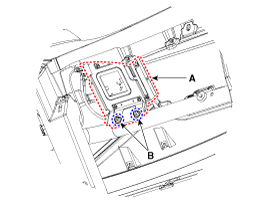
- Disconnect the eCall antenna connector (A).
- Loosen the mounting nuts (C), then remove the eCall antenna (B).
- Disconnect the negative (-) battery terminal.
- Remove the cluster fascia panel. (Refer to Body - "Instrument Panel")
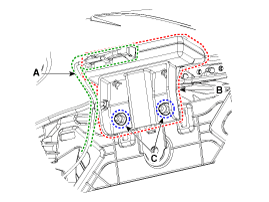
- Disconnect the eCall speaker connector.
- Loosen the mounting nuts (B), then remove the eCall speaker (A).
Replacement
eCall Backup Battery (BUB)- Disconnect the negative (-) battery terminal.
- Remove the eCall module.
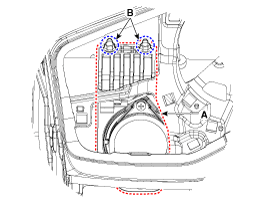
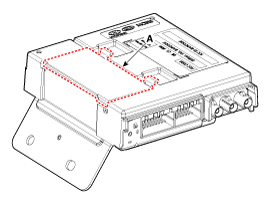
- To replace the backup battery, remove it after removing the backup battery compartment cover (A).
Installation
eCall module- Install the eCall module.
- Connect the connectors to the eCall module.
- Install the glove box housing.
- Connect the negative (-) battery terminal.
- Install the eCall antenna.
- Connect the eCall antenna connector.
- Install the driver airbag module assembly.
- Connect the negative (-) battery terminal.
- Install the eCall speaker.
- Connect the eCall speaker connector.
- Install the cluster fascia panel.
- Connect the negative (-) battery terminal.
Inspection
Inspection (with KDS/GDS)- Malfunctions in the body electrical system can be quickly diagnosed using the vehicle diagnostic system (KDS/GDS). The diagnostic system (KDS/GDS) provides the following information.
- Self-Diagnosis: Checks for malfunctions and Diagnostic Trouble Codes (DTCs).
- Current Data: Checks the input/output status of the system.
- Actuation Test: Checks the operating condition of the system.
- Additional Function: Controls other functions, including system setting parameters and zero point adjustment.
- Select "Vehicle Model" and "Telematics System" to inspect the vehicle with the tester.
- Select the "Current Data" menu to check the current input/output data.
- Test Mode Operating Conditions
- The vehicle battery is connected properly.
- One minute has passed after ignition ON.
- The vehicle remains stationary for 1 minute or more.
- Conditions Preventing Test Mode Operation
- PSAP Call in Progress
- Callback Mode: The eCall system enters callback mode after a successful call and remains on standby for 120 minutes to receive calls from the call center.
- Test mode is automatically terminated when the vehicle speed reaches 1 km/h or more, or after traveling 300 m or more.
- Less than two minutes have passed since the previous test call was completed.
- Test Mode Sequence (Audio Guidance)
- LED Test
- Speaker Test
- MIC Test
- BUB (Back-Up Battery built into eCall unit) Test (No separate notification is given if the BUB is in normal condition.)
- Test Call (Pressing the SOS button sends the test result to the PSAP.)
Test yourself
A quick Kia Cee'd quiz: every answer comes with an explanation and a link to the manual page.
Was this page helpful?