Navigation system: destination search
Destination search by Home
In this manual: Navigation system: destination search
~1min read
1. Push the “DEST” button.
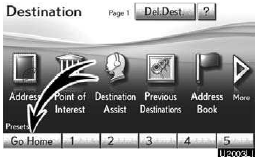
2. Touch “Go Home”.
The screen changes and displays the map location for home and the route preference.
(See “Starting route guidance” on page 83.) If home has not been registered, a message will be displayed and the setting screen will automatically appear.
To use this function, it is necessary to set a “Home” address. (To register “Home”, see page 111.)
INFORMATION
Guidance starts from the current vehicle position to your home if “OK” is touched even while driving.
Test yourself
A quick Lexus GX quiz: every answer comes with an explanation and a link to the manual page.
Was this page helpful?