Navigation system: destination search
Destination search by “Emergency”
In this manual: Navigation system: destination search
~1min read
1. Push the “DEST” button.
2. Touch “Emergency” on the second page of the “Destination” screen.
The display changes to a screen to select police stations, dealers, hospitals or fire stations. While driving, only nearby police stations, dealers, hospitals, or fire stations are shown. The current position is shown with an address, and the latitude and the longitude at the top of the screen.

3. Touch the desired emergency category.
The selected emergency category list is displayed.
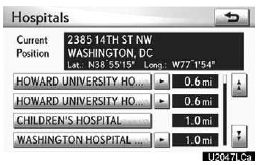
4. Touch the button of the desired destination.
The screen changes and displays the map location of the selected destination and the route preference. (See “Starting route guidance” on page 83.)
INFORMATION
The navigation system does not guide in areas where route guidance is unavailable.
Test yourself
A quick Lexus GX quiz: every answer comes with an explanation and a link to the manual page.
Was this page helpful?